Do Rideshare and Taxi Drivers Need a Body Camera?
Consider the recording gap, seated view, passenger privacy and approved file-sharing procedures.
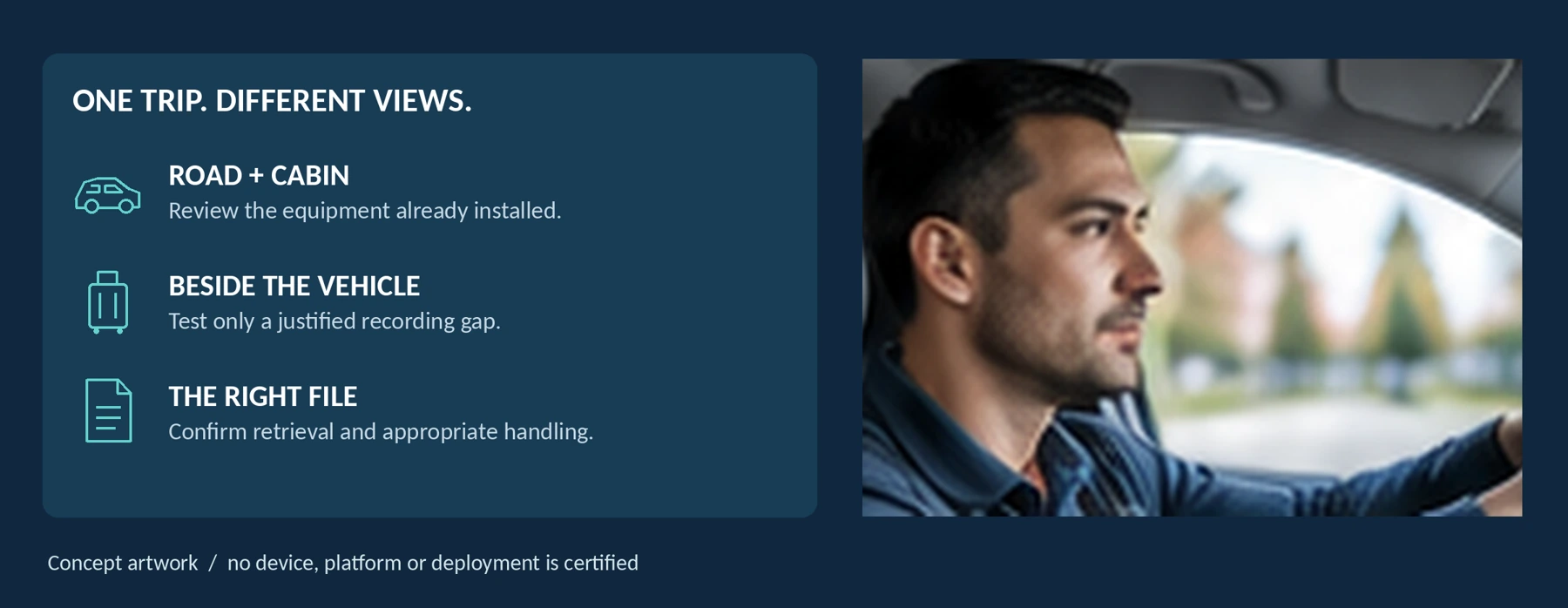
Editorial guidance, not legal advice or a model-specific performance promise. Check the rules and requirements that apply to your location and use.
The decision in brief
Not necessarily. When your existing road-facing and cabin cameras already meet your justified recording needs, our recommendation is to keep that setup rather than add another device by default. Consider a body camera only when it can address a specific, permitted task that remains uncovered—such as an interaction beside the vehicle during a luggage handover.
The useful question is:
“What do I need to record that my current equipment cannot show, and will a wearable camera actually capture it?”
This guide is for rideshare drivers, taxi and private-hire drivers, and small vehicle operators. It focuses on the decision to add wearable recording, not how to replace a dash cam or install vehicle wiring. It includes a coverage worksheet, a fictional incident-record example, and a proposed trial. None is a promise of fewer disputes, a successful appeal, or improved personal safety.
Start with the recording gap
Map the Trip Before Adding Another Camera

Separate five tasks: the road, the passenger cabin, boarding and exiting, luggage handling, and relevant activity away from the vehicle. Then inspect what your existing equipment actually records.
Do not count lenses or channels as proof of complete coverage. A rear camera aimed through the back window and a cabin camera aimed toward the rear seats answer different questions. Map the direction of each lens and review its saved files.
Use this as an assessment framework, not a recommendation to record every stage:
| Task to assess | Existing equipment to check first | What remains to establish before adding a body camera |
|---|---|---|
| Road events while driving | The installed road-facing cameras and their saved recordings. | A body-worn device should not be counted as another road view without a useful, stable result. |
| An interaction inside the cabin | The actual view and permitted audio from the cabin system. | Does it capture the required interaction? Would adjusting or replacing that system address the issue more directly? |
| Boarding and exiting | Coverage around the relevant door and the recording start-and-stop behavior. | Is there a justified gap, and can the proposed wearable view capture it without distracting the driver? |
| Luggage loading and unloading | Any existing view of the luggage area, plus appropriate incident notes. | Does a worn camera show the relevant action, or do arms, luggage, and the open lid block it? |
| An authorized task away from the vehicle | Existing reporting arrangements and any suitable permitted recording method. | Is hands-free capture needed, and can it be used without escalating an encounter or intruding unnecessarily? |
A missing recording is not always a missing camera. Check whether the problem is an obstructed lens, incorrect settings, exhausted storage, or a file you have not learned to retrieve. Fixing that problem may be the better first step.
Test the seated view before adding equipment
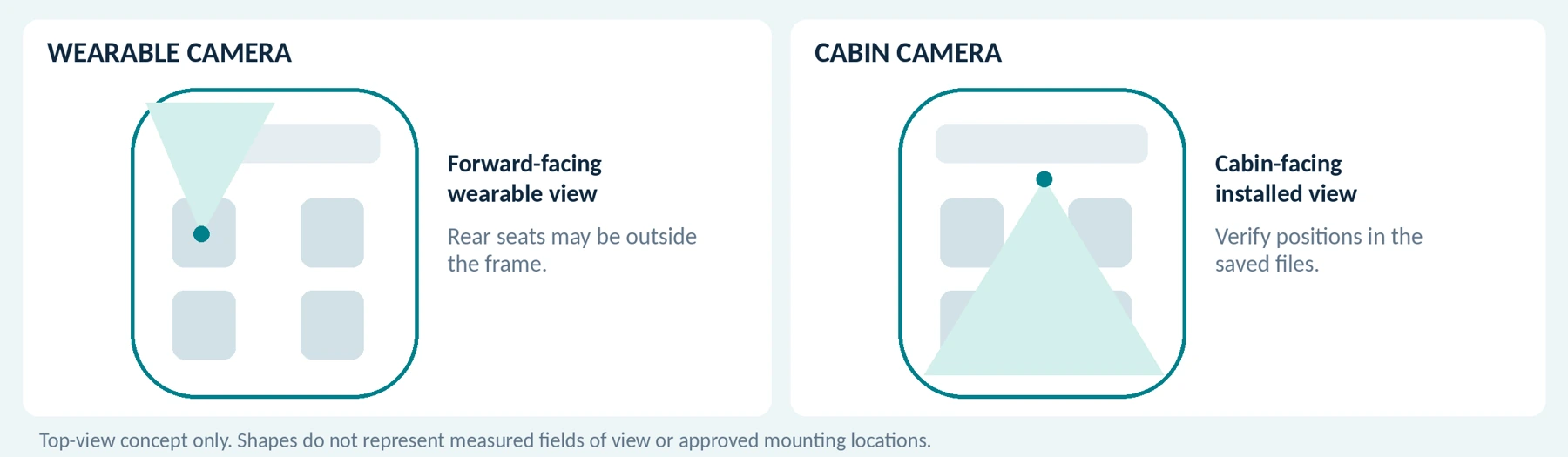
In a safely parked vehicle, sit in your normal driving position and fasten the seat belt as intended. Ask a consenting participant to sit in the passenger positions you need to assess. Record a short practice interaction and inspect the file.
What does the worn lens show: the dashboard, windscreen, your arm, the front passenger, or the rear seating area? Repeat with the jacket and clothing you use for work. Do not infer the view from a photograph of the camera clipped to a shirt.
Do not turn your torso or repeatedly adjust equipment while driving to keep a passenger in shot. Reject an arrangement that requires this. Never reroute a seat belt, interfere with airbags, or compromise vehicle controls to accommodate a camera.
For a primarily in-cabin requirement, our recommendation is to evaluate the properly installed cabin view first. Reserve the wearable option for a demonstrated advantage rather than assuming portability improves every recording.
The companion guide Can a Body Camera Replace a Dash Cam? addresses vehicle power, automatic recording, temperature, and parking modes in detail. Here, the question is whether an additional device solves your particular work task.
Working sheet: parked-vehicle framing check
Use a consenting participant and a safely parked vehicle. Do not alter the seat belt or safety equipment.
| Check | Saved view / limitation / next action |
|---|---|
| Normal driving posture | Not specified Not specified |
| Passenger positions | Not specified Not specified |
| Jacket and ordinary movement | Not specified Not specified |
Check existing equipment and platform rules

Could Equipment You Already Have Be Enough?
Assess three starting points before spending more.
An existing road-and-cabin setup: check coverage, permitted audio, recording continuity, and retrieval. When it passes the essential requirements and you have no justified outside-vehicle need, there may be nothing for a body camera to add.
A road-facing camera without a suitable cabin view: investigate the missing cabin requirement directly. Do not buy a body camera merely because it is easier to clip on than to assess an appropriate in-vehicle system.
A platform recording feature available in your account: test its scope and limitations before treating separate hardware as necessary.
For example, Uber’s Record My Ride FAQ describes recording with the phone’s selfie camera and microphone in supported markets and devices. It documents different app-switching behavior on iOS and Android. Its access rules are not an ordinary local-video library: review is limited to eligible recordings, and downloading or sharing those recordings is prohibited. [3]
Test the phone position, required work apps, and supported reporting route. Do not assume a feature available on one platform records trips from another platform, off-app taxi jobs, or activity away from the mounted phone. Those are separate requirements to verify.
For independent-phone versus dedicated-camera considerations, see Body Camera vs. Smartphone: Do You Need a Separate Camera?
Platform Registration Is Not Recording Permission—or a Backup
Check the rules for your actual platform and market, then check local law, licensing conditions, and any vehicle-owner or operator requirements separately.
Uber: its US/Canada Community Guidelines discuss dashcam and phone recordings, local notice or consent requirements, and submission to Uber for review. The guidance does not establish that every wearable configuration is approved for every location. [1]
Lyft: its US help page directs drivers to local recording rules. It says dashcam registration is optional and that Lyft does not have direct access to the registered cameras. Registration should not be treated as automatic upload, monitoring, or preservation of your files. [2]
For a proposed body camera, ask whether the relevant declaration process covers that device and its intended use. Describe whether it is worn only outside the car, used inside, or moved between positions. Do not silently register a different arrangement and assume the notice accurately describes it.
Uber’s FAQ says dashcam registration or enabling Record My Ride triggers rider notification. That is a platform notification function, not a substitute for separately required consent or other local obligations. [3]
For taxi work without a rideshare app, establish the operator’s and licensing authority’s requirements directly. A service without an in-app declaration screen still needs an appropriate recording and information process.
Check local requirements and explain the setup
Local Vehicle Rules Can Change the Purchase
For London, Transport for London’s currently linked CCTV guidelines require approved systems for installation in licensed taxis and private-hire vehicles. The document covers in-vehicle recording equipment and specifies conditions beyond simply being able to capture video. This is a London example, not a rule for every UK or European taxi. [4]
Do not assume wearing a camera instead of fixing it to the vehicle bypasses the relevant requirements. Ask the licensing authority how the proposed arrangement is treated, and obtain any necessary approval before buying. Also resolve changes to rented, leased, shared, or fleet vehicles with the responsible party.
Video and Conversations Need Separate Decisions
United States: check the relevant state and circumstances. California Penal Code section 632 addresses confidential communications recorded without all-party consent, with qualifications about what is confidential. It does not establish a single rule for all conversations in every US vehicle. [6]
United Kingdom: the ICO’s vehicle-surveillance guidance generally recommends audio off by default and used exceptionally, with strong justification for continuous audio. It also addresses clear privacy information and responsibility for handling the recordings. The page is marked as under review. [5]
European Union: establish the appropriate legal basis and national requirements. The EDPB explains that valid consent, when relied upon, must be freely given, informed, specific, and unambiguous. Consent is not the only possible basis, and a notice is not automatically consent. [7]
Resolve uncertain arrangements with the operator and qualified local advisers. This article does not determine whether a particular recording, refusal of service, disclosure, or court submission is lawful.
Explain the Actual Setup to Passengers
Our recommendation is to make the recording arrangement understandable before an objection becomes a dispute. Use the required notices and any approved verbal explanation, accurately describing video, audio, activation, the responsible contact, and access arrangements.
For a genuinely approved video-only configuration, a plain-language explanation could be: “This vehicle records cabin video; audio is off. The recording notice explains who manages the files and how to ask questions.” This is illustrative wording, not a complete legal notice. Do not use it when any device is recording sound or when the described information is unavailable.
Consider all occupants, not only the person who booked. Plan how required information reaches companions or people who did not see an app notification. Review the applicable arrangements for children and assistance services without making assumptions about who can agree for someone else.
When a passenger objects, follow the applicable procedure rather than inventing an “accept filming or no ride” rule. Avoid roadside arguments and unsafe outcomes. Include service and accessibility obligations in that procedure; Uber’s guidelines separately address nondiscrimination and service animals or assistive devices. [1]
Do not secretly select people for recording based on appearance, destination, or a personal suspicion unsupported by the agreed criteria.
Test the luggage handover and curbside view
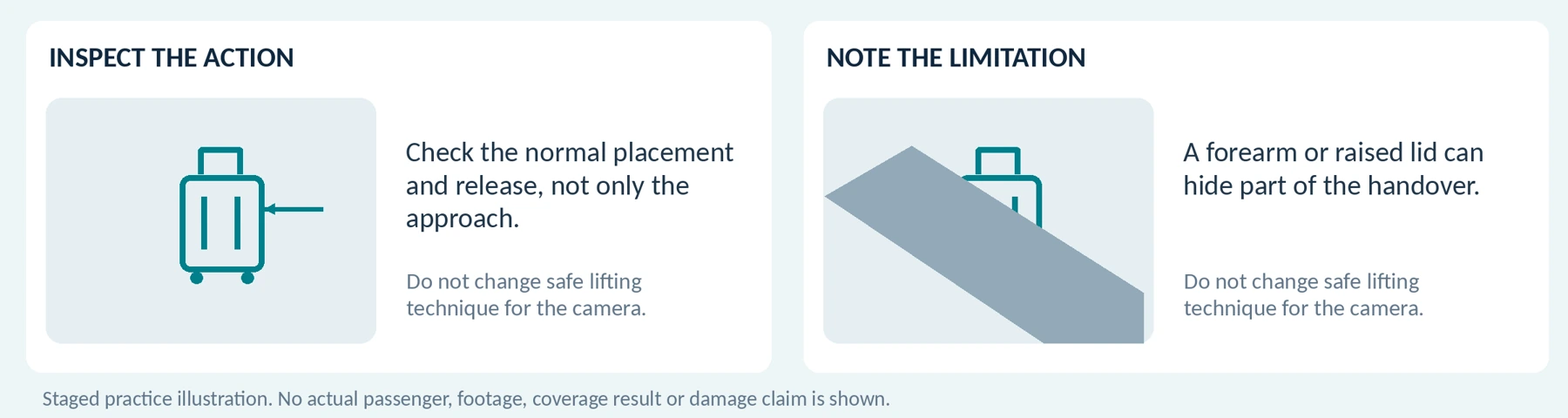
This is where a wearable camera may add a different view—but only when the intended task, notice, and recording scope are appropriate.
In a fictional exercise, a consenting participant hands the driver a training suitcase beside a safely parked vehicle. The driver places it in the luggage area and later returns it. Compare the vehicle recordings with the wearable recording.
Inspect the handover and placement, not merely the walk to the trunk or boot. Check whether your forearm, bag, jacket, or the raised lid blocks the relevant action. Repeat the ordinary task without changing safe lifting technique for the camera.
If the clip shows only the case’s exterior, it cannot establish the condition of everything inside. An incomplete view also cannot establish who caused a mark outside the recorded sequence. Do not open a passenger’s belongings to make a more comprehensive record.
Do not leave the vehicle to obtain confrontation footage, follow a rider, or recreate an event. Uber’s guidelines restrict unwanted post-trip contact; use the designated reporting process. [1]
For appropriate assistance outside the vehicle, keep the service task first. Do not point the camera unnecessarily at a passenger’s documents, phone, payment entry, home interior, or identifying details. A wearable camera should not turn every pickup into a filmed interview.
Working sheet: inspect the ordinary movement
Use fictional trip details, safe training luggage and consenting participants in a permitted practice location.
| Practice task | Observed view / limitation / adjustment |
|---|---|
| Normal handover | Not specified Not specified |
| Loading / unloading | Not specified Not specified |
| Clothing and arm movement | Not specified Not specified |
Verify the features for this particular job
![Optional buffer behavior is model- and configuration-dependent. The timeline shows no tested or promised duration. [9]](https://spikecam.com/wp-content/uploads/spikecam-knowledge/b05/figure-06.webp)
Practical Start, Stop, and Feedback
Practice with the actual mount and clothing while safely parked. Confirm the difference between ready, recording, and a warning, then inspect the first and last saved frames.
Check buffering and automatic triggers separately. Axis documents optional prebuffering and postbuffering; with postbuffering, its system can keep capturing after the wearer stops recording while the camera indicates that recording has stopped. These are specific configuration options, not features to assume on every product. [9]
Use a staged sequence to verify when capture really begins and ends. Do not promise passengers that a device is off based only on an untested indicator or a covered lens.
Useful Nighttime Detail and Appropriate Sound
Test the parked cabin and an approved practice area outside it, using consenting participants in the positions that matter. Include ordinary movement, relevant lighting, and normal background noise. Review the exported files on the same equipment.
Axis’s image-quality guidance explains why a sharp stationary scene can still contain blurred moving subjects under slow exposure. A static night sample or a resolution label does not settle the question. [10]
Where sound is justified and permitted, test the other person’s speech as well as your own. Do not choose an always-on microphone simply because conversations could be useful later; use the arrangement established for your location and purpose.

Keep the driving routine simple

Before work: check the approved configuration, charge, storage, mount, clock, recording scope, and required notices. Confirm the current vehicle and user assignment, especially after changing a rental vehicle or sharing equipment.
At pickup and during the journey: follow the service’s normal verification and trip process. Configure equipment before moving, keep attention on driving, and report failures honestly. Do not alter the trip’s official start or end to make a camera recording more convenient.
At drop-off: complete the service and any appropriate assistance safely. Apply the agreed recording stop procedure rather than assuming an app’s trip status controls an independent device.
After an incident: prioritize safety and urgent help, not footage. Uber directs users in immediate danger to emergency services first. Do not mistake a recording function for monitored assistance. [1]
After work: complete authorized transfer and preservation, verify relevant files, and prepare the next use. Check what happens during breaks and personal vehicle use. The ICO’s taxi example identifies unnecessary recording during private use outside work as potentially excessive. [5]
Readiness, Heat, and Phone Independence
Define the time the camera must remain available and the recording pattern it must support. Test that pattern across the assignment, including a permitted activation near the end.
The AXIS W110 manual identifies battery capacity and storage as separate operating limits and warns against leaving that model in a parked car because temperatures can exceed its limits. Verify your candidate’s own operating, charging, and storage instructions. [8]
Ask whether recording requires a connected phone, which power arrangements are supported, and how files are retrieved. Test compatibility with your necessary work functions rather than assuming a camera connection cannot interfere with them.
Working sheet: readiness and fallback
| Item | Record before the trial |
|---|---|
| Time and settings | Required ready period / intended recording pattern: Not specified |
| Limits and power | Model operating, charging and storage limits checked: Not specified |
| Essential phone tasks | Apps, connection and safe stationary test: Not specified |
| Failure response | Reporting contact and approved fallback: Not specified |
Connect the recording to the right trip
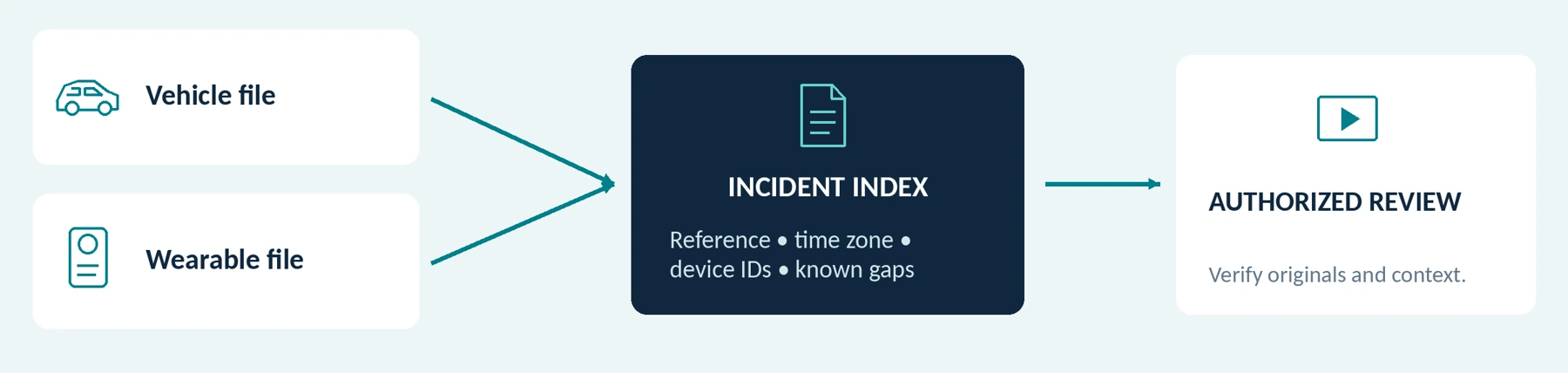
Plan retrieval before you need it. Our suggested index connects the service or operator, the trip or incident reference, date and time zone, assigned vehicle and device, and relevant source files.
Separate a late luggage handover from the recorded in-cabin journey when their timing differs. Compare clocks and document discrepancies rather than silently altering original timestamps. Preserve relevant surrounding context instead of selecting only the most dramatic few seconds.
The following is a fictional training record, not a passenger account or a measured product result:
| Field | Illustrative entry |
|---|---|
| Exercise reference | DEMO-RIDE-005; parked-vehicle practice, no real booking. |
| Time and location | September 24, 2026, approximately 20:10–20:13, UTC−07:00; Training Bay A. |
| Task | Consenting participant receives a training suitcase beside the luggage area. |
| Vehicle recording | Shows the participant leaving the cabin; luggage handover is outside that camera’s view. |
| Wearable recording | Shows part of the handover; the driver’s forearm obscures the first moments. |
| Review note | Original references retained, clock check documented, limitations recorded, and authorized playback verified. |
For a real report, state what you observed and what the footage shows separately. A later reviewer should not have to guess whether a claimed detail was visible, inferred, or reported by someone else.
Keep only the personal information necessary for the purpose. Avoid full passenger names, home addresses, trip credentials, or identity documents in ordinary filenames or shared worksheets.
Submit relevant records—not promised outcomes

Ask the relevant platform, operator, insurer, or other authorized recipient which material and submission method it requires. Do not assume every support form accepts video or that a publicly accessible cloud link is appropriate.
A safety report, a vehicle-damage request, and a fare dispute are different processes. Follow the applicable instructions and deadlines even when you have a recording.
For example, Lyft’s US damage-reporting page, checked for this guide, asks for a report within 24 hours, ride details, an explanation, and at least three well-lit photographs from different angles. This is a specific damage-report requirement, not a universal deadline for all claims or services. [11]
Uber’s vehicle-damage page separately requests photographs and a professional repair estimate or receipt under its stated conditions, and directs cleaning requests to a different process. A camera clip should not be assumed to replace those materials. [12]
Preserve relevant originals through the authorized route. Where your system permits independent export, verify a protected copy and keep edited or redacted sharing versions separate. For restricted platform recordings, use the supported access and submission process instead of trying to bypass download controls.
Do not present reconstructed footage, AI-generated detail, or selectively assembled scenes as original capture. Include known gaps and relevant context that may challenge your initial account.
No camera can guarantee a fee, reinstatement, liability decision, or court outcome. Evaluate the device for usable, appropriately handled records—not promised victories.
Do Not Turn Passenger Footage into Online Content
Uber’s US/Canada guidelines prohibit public sharing or streaming of a person’s image or recordings. Lyft’s published policy prohibits broadcasting another person’s image or recording without express prior consent. These are distinct policy wordings; neither is a general permission for a driver to publish passenger videos. [1][2]
Our recommendation for work-related incident recording is non-public handling through appropriate channels, not social-media exposure. Blurring a face is not a reason to assume that platform, privacy, or confidentiality obligations disappear.
Assign file responsibilities and review retention

Access You Are Actually Entitled to Use
Request a demonstration of new recording, authorized retrieval, playback, and any permitted export. For a fleet-managed system, identify the person who can retrieve a clip when the driver cannot.
Do not borrow an administrator’s credentials to make the purchase appear usable. Confirm account, software, service, and accessory requirements before counting a feature as available.
Clarify whether the driver, vehicle owner, fleet, or another organization manages each recording system. Identify who handles preservation requests, lost equipment, departed drivers, and privacy questions. Do not assume paying for the camera settles every responsibility.
Use approved accounts, controlled access, and the necessary security protections. Verify copies rather than treating a thumbnail, upload indicator, or registered-device entry as a backup.
Set retention for a justified purpose and applicable requirements. The ICO’s surveillance guidance does not prescribe one universal minimum or maximum period; it warns against retaining footage simply because capacity allows it and recognizes specific justified preservation needs. [13]
Review incident holds and the deletion of copies too. Do not keep a permanent personal archive of every passenger journey “just in case.”
Handle a passenger’s access or deletion request through the responsible process rather than promising an immediate unrestricted copy or roadside erasure. ICO governance guidance addresses locating relevant footage, requests, and protection of other people’s information. [14]
For shared or fleet vehicles, test access before the assignment ends or the vehicle is returned. A device you can no longer access is not a dependable personal retrieval plan.
Working sheet: who is responsible?
| Responsibility | Named role / approved route |
|---|---|
| Retrieve and preserve | Not specified Not specified |
| Access and requests | Not specified Not specified |
| Incident hold / review | Not specified Not specified |
| Lost device / staff change | Not specified Not specified |
Run a controlled comparison before buying

Begin with a parked vehicle in a permitted practice location, consenting participants, fictional trip details, and safe training luggage. Do not create a real booking, argument, collision, or unannounced passenger test.
Compare the existing arrangement first, then the proposed addition. Record device models, firmware, settings, clothing, vehicle, lighting, and test conditions. This is a proposed acceptance method, not a report of hands-on testing.
| Trial | What to do | What should be demonstrated |
|---|---|---|
| Existing coverage | Review a staged cabin interaction using current equipment. | Whether a meaningful recording gap actually exists. |
| Seated wearing | Sit normally with the seat belt correctly fitted; use normal controls only while parked. | A usable view and no interference with restraints, driving controls, or comfort. |
| Boarding and luggage | Rehearse entry, exit, and a normal training-case handover. | Useful additional information without unsafe movement or unnecessary capture. |
| Recording boundaries | Rehearse the approved activation, stopping, objection, and break procedures. | Actual first and last saved moments, correct audio, and understood failure responses. |
| Time and work functions | Run the intended readiness pattern; test necessary phone tasks while safely stopped. | Sufficient operation and practical coexistence with the driver’s other equipment. |
| Retrieval and submission | Ask the designated person to find a specified exercise and prepare an authorized submission. | Correct source files, usable playback, documented gaps, permitted sharing, and measured handling time. |
Mark essentials Pass, Fail, or Unverified. A camera that adds no necessary information has not justified its cost merely because it records successfully.
Where a road test is needed, configure the equipment before departure and review files afterward; never interact with it while driving. A short practice clip does not establish assignment-length reliability.
Make the decision and price the complete setup
Choose among four outcomes rather than assuming the answer must be a new camera:
| Finding | Suggested next step |
|---|---|
| Existing equipment meets the justified requirements. | Keep it, maintain it, and do not add a wearable device without another demonstrated need. |
| The main gap is in-cabin coverage or retrieval. | Improve the relevant vehicle system or its handling process first. |
| A permitted outside-vehicle task remains uncovered and the wearable trial addresses it. | Consider the tested body-camera setup as a supplement. |
| Permission, privacy, safe operation, or access remains unresolved. | Pause the purchase or deployment and resolve the issue before proceeding. |
For a quotation, provide your country and licensing area, services used, vehicle arrangement, existing camera views, the uncovered task, permitted audio, required duration, clothing, and file-handling responsibilities. Send descriptions or sanitized test material—not real passenger footage or private trip information.
Compare the additional cost of a workable setup: camera, compatible mount, power and transfer equipment, storage, required software or services, support, and handling time. Do not allocate the entire historical cost of your existing phone or cameras to this new decision.
The companion guides Do Body Cameras Require a Subscription? Fees Explained and How Much Does a Body Camera Cost? A Buyer’s Budget Guide cover the detailed cost checks.
Working sheet: quotation brief
Describe the requirements without sharing real passenger footage, trip credentials or private details.
| Requirement | Your specification |
|---|---|
| Location and work | Country / licensing area / platforms: Not specified |
| Vehicle arrangement | Owned / rented / shared / fleet: Not specified |
| Existing coverage | Road, cabin and other views already verified: Not specified |
| Uncovered task | Specific permitted information gap: Not specified |
| Time, clothing, audio | Required pattern and approved configuration: Not specified |
| Files and cost | Responsible role, file route and total budget: Not specified |
Keep what works. Verify any addition.
Rideshare and taxi drivers do not automatically need a body camera simply because they carry passengers. Start with the road and cabin coverage you already have, then identify any justified task it cannot address.
A wearable camera may be useful for a permitted luggage handover or other activity beside the vehicle. It earns that role only when a trial demonstrates the needed view, safe operation, appropriate recording boundaries, and reliable file handling.
When asking about a SpikeCam model, describe that gap and request confirmation for the exact product and package. This guide does not imply Uber, Lyft, or taxi-authority approval, automatic trip matching, platform uploads, encryption, pre-recording, or fleet integration for any unverified model.
Keep what already works. Add a body camera only when it solves a specific problem without creating an unacceptable one.
Editable trial and decision record
Planning form, not a product certification. Use Pass, Fail or Unverified for essentials; use Not needed only for a genuinely optional requirement.
| Essential check | Status | Evidence / unresolved action |
|---|---|---|
| Existing coverage reviewed | Not specified | Not specified |
| Safe seated and curbside use | Not specified | Not specified |
| Recording permission / scope | Not specified | Not specified |
| Start, stop and permitted audio | Not specified | Not specified |
| Duration and phone coexistence | Not specified | Not specified |
| Authorized retrieval / submission | Not specified | Not specified |
Model / firmware / mount: __________________________________________________________
Trial date / conditions / reviewer: ____________________________________________________
Decision and unresolved items: ______________________________________________________ ________________________________________________________________________________
References and edition notes
Source checks in the supplied article: September 24, 2026. The reference list and source dates are carried forward from that manuscript. Check current requirements before publication or deployment.
[02] Lyft US Help — Safety policies, recording device policy
[03] Uber Help — Record My Ride: Frequently Asked Questions
[05] UK Information Commissioner’s Office — Surveillance in vehicles
[06] California Legislature — Penal Code, section 632
[07] European Data Protection Board — Process personal data lawfully
[08] Axis Communications — AXIS W110 Body Worn Camera user manual
[09] Axis Communications — Axis body worn solution user manual, camera profile settings
[10] Axis Communications — Troubleshooting guide for image quality
[11] Lyft US Help — Reporting damage caused by passengers
[12] Uber Help — Rider damaged my vehicle
[14] UK Information Commissioner’s Office — Governance (post-deployment)
Sources checked September 24, 2026. Platform examples reflect the cited market and support pages; account availability, current app behavior, local law, licensing conditions, and actual claims instructions must be checked for the intended use. TfL guidance is a London example; UK, EU, and California references have their stated scopes. The cited ICO material is marked as under review. Scenarios, worksheets, and trials are editorial tools, not real passenger records or measured performance. No deployment, legal compliance, claim outcome, platform endorsement, or unverified SpikeCam feature is certified by this article.
Illustration note: concept diagrams and AI-created context artwork do not represent real passenger footage, measured fields of view, approved installation, platform endorsement or a demonstrated product result. Added worksheets are editable planning aids.
Related articles
Body Cameras for Property Managers and Field Service Workers
Match recording to the job, distinguish common areas from home visits and plan file handling.
Body Cameras for Personal Safety: Walking, Dog Walking, and Commuting
Understand the limits of recording and keep safety, getting help and privacy ahead of equipment.
Body Camera Buying Guide: How to Choose the Right One
Choose a camera around recording controls, battery life, file access and your actual working routine.
