Body Cameras in Healthcare and Home Care: Privacy Before Purchase
Start with privacy, care quality, equipment suitability and responsible review before considering recording.
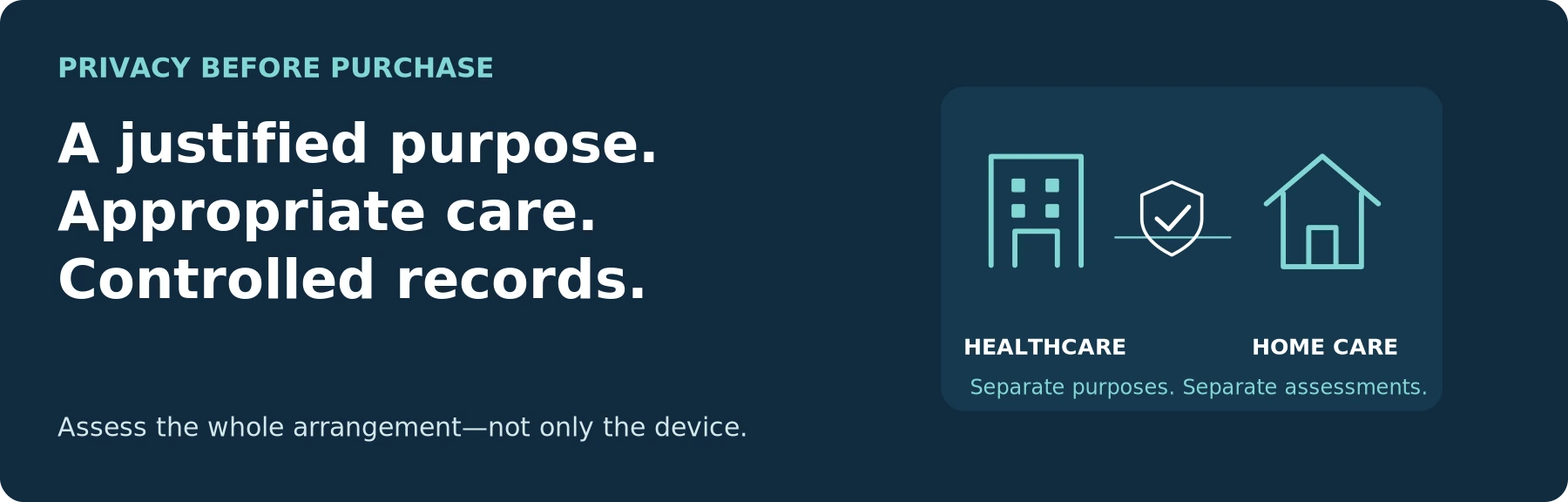
Editorial guidance, not legal advice or a model-specific performance promise. Check the rules and requirements that apply to your location and use.
Read the assessment before comparing models. The worksheets support discussion; their completion does not approve equipment or a clinical recording practice.
Care first. Establish the need.
A body camera should not be a default accessory for healthcare or home-care staff. Consider an organization-led assessment only when there is a specific, justified recording need that less intrusive measures cannot adequately meet. Start with patient dignity, care delivery, and the handling of sensitive information—not a camera specification sheet.
The practical question is:
“Is this recording necessary, can it be made appropriately without interfering with care, and can the organization control every subsequent use of the file?”
The UK's Information Commissioner's Office (ICO) calls for stronger justification for body-worn recording in private dwellings and care homes. Its guidance also requires organizations to assess necessity and proportionality before deployment. That is a jurisdiction-specific starting point, not permission to record every clinical encounter. [1]
This guide is for healthcare organizations, home-care agencies, and their responsible decision-makers. It is not a recommendation for individual employees to buy a camera and begin recording patients. Patient-initiated recordings, family-installed cameras, diagnostic imaging, and covert investigations require separate assessments.
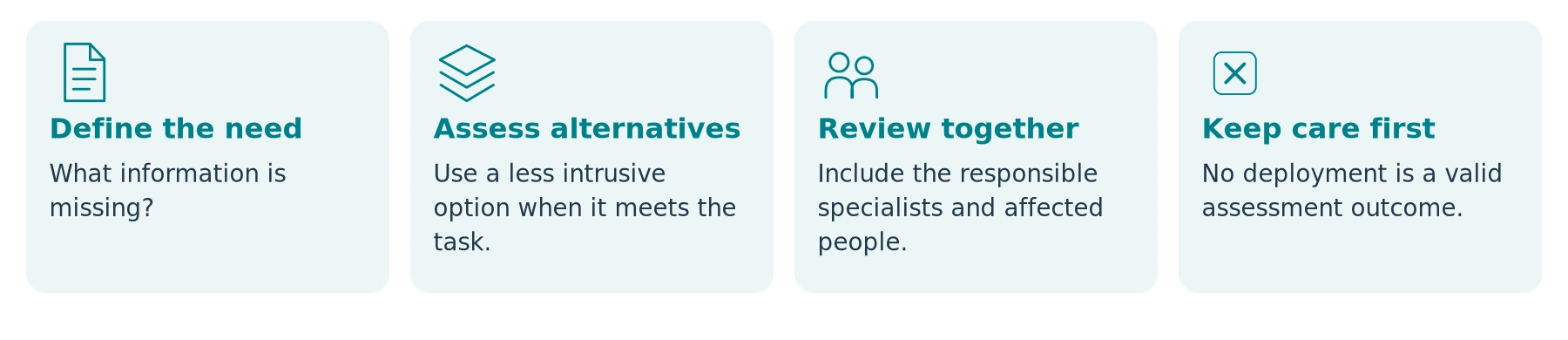
Examine Alternatives Before Expanding Recording
Write down the problem in a sentence that does not mention a camera. For example: “Our current reporting process leaves uncertainty about the sequence of a particular type of incident.” Then compare ways to address that problem.
Depending on the task, assess better incident notes, improved handover, appropriate existing CCTV, clearer communication, additional staff support, or a targeted clinical image under the relevant procedure. Another recording method still needs its own privacy and clinical justification.
For community visits, review lone-worker arrangements independently. The UK's Health and Safety Executive (HSE) guidance for health and social care discusses pre-visit risk assessment, staffing, communication devices, check-ins, and alternatives such as paired visits where appropriate. A recording device does not replace those measures or establish that someone is monitoring and responding. [2]
Do not make emergency assistance, safeguarding reporting, or a patient's complaint depend on obtaining footage. Staff should report recording gaps honestly, without recreating an event or prolonging an unsafe interaction.
A decision not to deploy can be a successful assessment outcome. The objective is an appropriate response to the need, not a camera for every worker.
Separate Hospital Security, Clinical Care, and Home Care
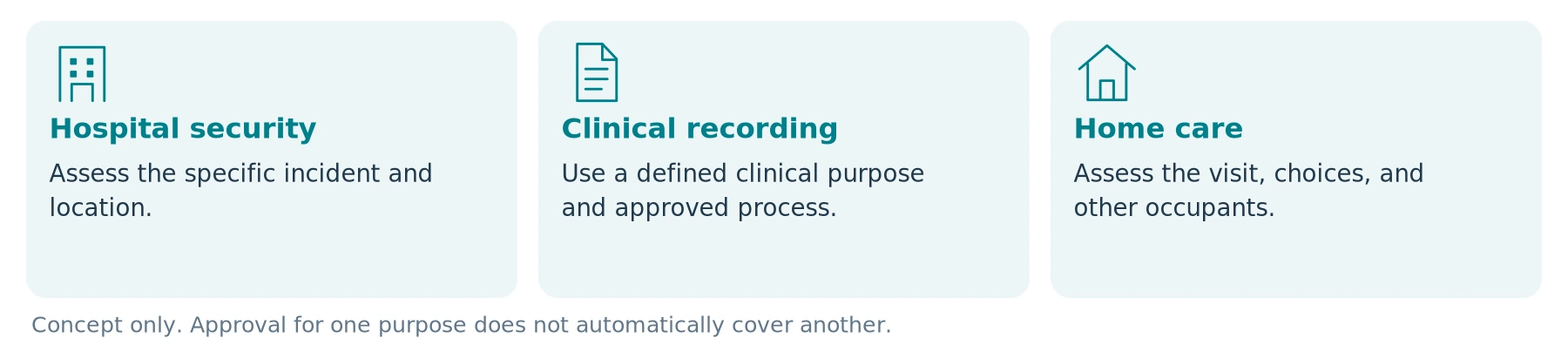
The person wearing the camera and the purpose of the recording are separate questions. A security officer entering a ward can capture clinical information; a clinician wearing a device for incident documentation is not necessarily creating a treatment recording.
Use this framework to define three distinct proposals:
| Proposed use | The question to resolve first | What must not be assumed |
|---|---|---|
| Hospital security or incident response | What information is needed about a defined event beyond existing reports, witnesses, or appropriate CCTV? | Approval for an entrance or car park automatically covers a treatment bay, consultation, or patient room. |
| Clinical care or a specific clinical recording | Why does this particular recording contribute to assessment or care, and what approved clinical process governs it? | An incident camera is validated for diagnosis, monitoring, documenting every procedure, or replacing clinical notes. |
| Home healthcare or personal care | Is recording necessary for the identified visit, and how will the person's home, choices, and other occupants be protected? | A care contract, permission to enter, or a relative's request authorizes recording the entire visit. |
Teaching, research, staff assessment, and publicity are additional purposes—not automatic extensions of one of these proposals. Identify them explicitly rather than allowing footage collected for one reason to become an unrestricted organizational video library.
For a security-only requirement, the companion guide Body Cameras for Security Guards: What to Look For provides operational questions. It does not replace the healthcare-specific assessment below.
Define the proposal before comparing devices
| Review item | Notes / evidence / responsible person |
|---|---|
| Setting and intended wearer | |
| Specific information the recording must supply |
Establish Responsibility Before Asking for a Quote
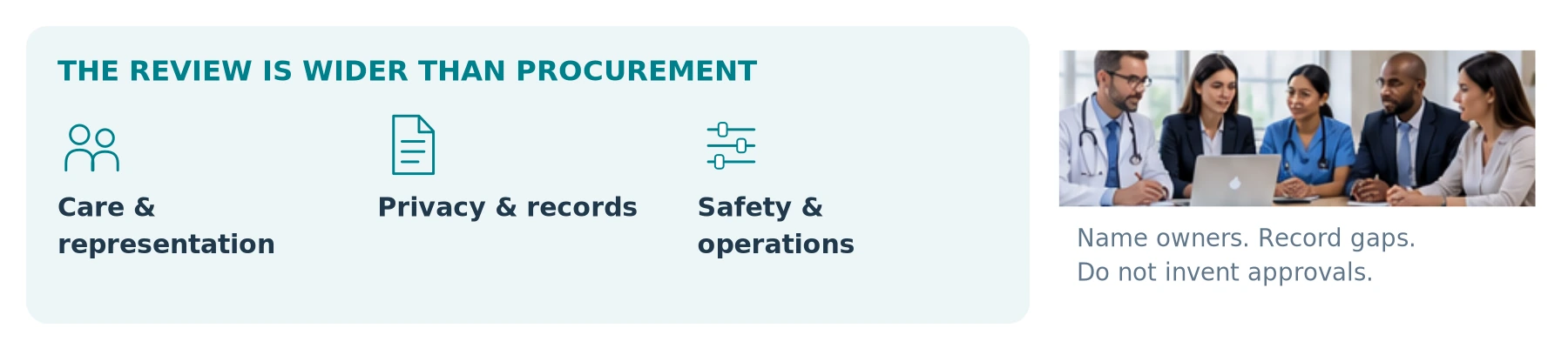
Have a named organizational owner coordinate the decision. Our suggested review group includes the following functions; smaller organizations may combine roles or obtain external expertise.
| Review function | Question to settle before a live deployment |
|---|---|
| Clinical leadership and safeguarding | Does the proposal support care, preserve dignity, and provide a safe response to distress, objections, or emergencies? |
| Privacy, legal, and information governance | What authorizes the capture and each use, what information must be provided, and how are individual rights handled? |
| Patients, service users, carers, and staff representatives | Are the explanation, alternatives, and complaint route understandable and workable for the people affected? |
| Infection prevention and relevant equipment-safety specialists | Can the entire device-and-mount arrangement be used, cleaned, and handled appropriately in the proposed setting? |
| IT security and records management | Can access, transfers, backups, retention, disclosures, and supplier exit be controlled and tested? |
| Operations and procurement | Who trains users, receives files, manages failures, and funds the complete arrangement? |
This is a proposed review structure, not a statutory committee specification. Record decisions, unresolved issues, and the person responsible for resolving each one. A supplier's assurance should not substitute for those decisions.
Assign an owner—leave approval status open
| Review item | Notes / evidence / responsible person |
|---|---|
| Organizational owner / target jurisdiction | |
| Unresolved question and assigned reviewer |
Identify the Applicable Privacy Rules
United States: Assess HIPAA Applicability and the Actual Information
The Health Insurance Portability and Accountability Act (HIPAA) does not cover every person who informally provides care. The US Department of Health and Human Services (HHS) identifies the covered organizations and explains that protected health information includes identifiable information about health, healthcare provision, or payment in any medium. A recording does not have to show a diagnosis on a screen to require assessment under those rules. [3]
Have the privacy lead determine whether the organization, provider relationships, and proposed footage fall within HIPAA. Identify the relevant permitted use or required authorization, and check other federal, state, professional, and recording requirements. HIPAA permits certain uses without individual authorization; that is not blanket authority for continuous wearable recording. [3]
The HIPAA Security Rule requires administrative, physical, and technical safeguards for electronic protected health information. HHS describes risk analysis, authorized access, training, and incident procedures as parts of the obligation. Buying an encrypted device does not complete that work. [4]
United Kingdom: Separate General Lawfulness from Health-Data Conditions
For special category data, including health information, the ICO identifies both an Article 6 lawful basis and a separate Article 9 condition under the UK GDPR, with additional UK-law requirements in relevant cases. These must be identified for the actual purpose—not assumed because the wearer works in healthcare. [5]
The ICO's body-worn guidance calls for a data protection impact assessment, or DPIA: an assessment of the proposed processing and risks to people. Its guidance is marked as under review. Check the current position and applicable confidentiality and professional requirements before deployment. [1]
European Union: Check National Requirements Alongside the GDPR
The European Commission explains that health information has additional processing conditions beyond the general legal grounds. Healthcare-related processing can qualify under specified conditions, but national law may impose further restrictions. Do not assume that a general treatment purpose also covers security recording, staff evaluation, or public use. [6]
This guide does not select a lawful basis for your organization or certify a deployment. Resolve the actual proposal with qualified local advisers before recording patients or service users.
Questions for the responsible privacy / legal reviewer
| Review item | Notes / evidence / responsible person |
|---|---|
| Organization and applicable jurisdiction | |
| Purpose, legal route, and additional conditions | |
| Required notices, agreements, and unanswered issues |
REVIEW BOUNDARY These questions do not select a lawful basis or certify a product. Review the actual proposal, setting, and service configuration.
Consent, Capacity, and a Family Request Are Not Interchangeable
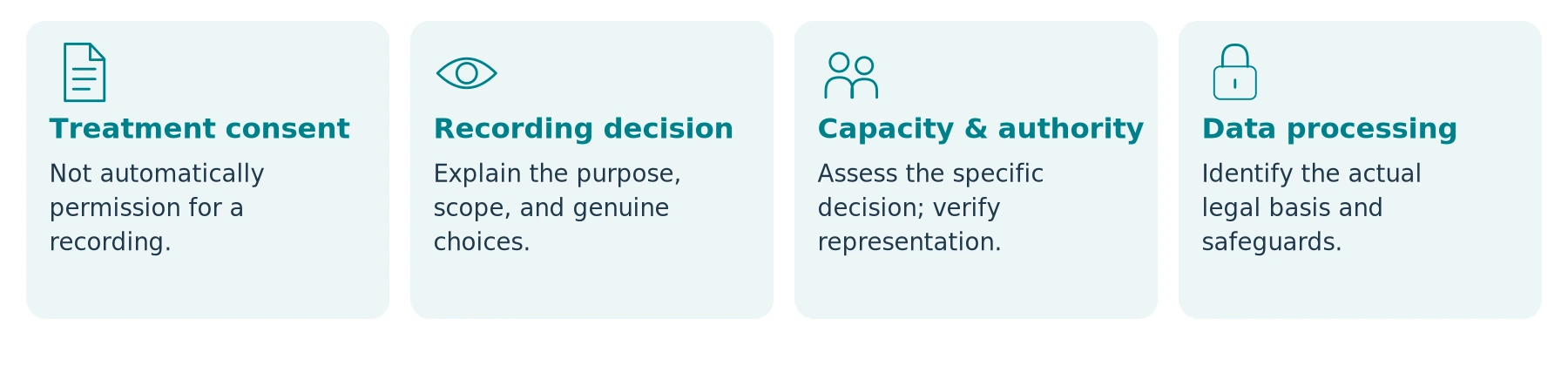
Explain the Recording Without Offering a False Choice
Consent to treatment, consent to a particular recording, a privacy notice, and the legal basis for data processing are different matters. The ICO specifically distinguishes clinical consent from data-protection consent and warns against requesting consent when a person has no genuine choice. [7]
Prepare accessible information about the purpose, audio, recording period, intended users, retention, and contact for questions. Include language and communication support where needed. Do not assume that silence, distress, or simply remaining in a care setting expresses agreement.
For genuinely optional recording, provide the stated alternative and respect the person's choice. Do not present unnecessary recording as the price of receiving needed care. If the organization relies on another lawful route for a narrowly defined incident, explain that arrangement accurately instead of asking for permission it intends to disregard. [7]
Capacity Is Specific to the Decision
The UK's General Medical Council (GMC) recording guidance says not to assume that inability to make one decision means inability to decide about recording. It calls for assessment at the relevant time and support that helps the person decide. Where someone else must act, establish the applicable legal authority rather than treating family presence as sufficient. [8]
For children, people with fluctuating capacity, or a disagreement involving a representative, use the appropriate professional and legal process. Do not diagnose incapacity from a camera clip, refusal, age, or a label on a care plan.
A relative paying for care or owning the home should not be treated as automatic authority to override the service user's wishes or receive all footage. Nor does one person's agreement settle the rights of roommates, visitors, and staff captured nearby.
Respond to Distress Without Turning Care into an Evidence Exercise
Define how staff pause, seek support, and use an alternative when the proposed recording causes distress or the situation changes. Exceptional safety incidents require an approved response, not an improvised claim that recording is always mandatory.
The GMC's guidance for recordings made for secondary healthcare purposes explains that withholding or withdrawing consent should not affect care quality. Apply the relevant rules to the actual recording purpose; do not transplant clinical-teaching consent arrangements onto every security incident. [8]
Care and urgent assistance come first. No one should have to repeat a distressing event merely to create a better clip.
Define Where Recording Must Not Become Routine
Our recommended default is to exclude intimate examinations, washing, dressing, toileting, private therapy, and other highly sensitive care from a general incident-camera plan. Any exceptional proposal needs separate authorization and safeguards; a general device policy is not enough.
For a shared ward, reception, or home visit, plan around other people and information in the frame. Check bed labels, medication packaging, wristbands, whiteboards, appointment lists, conversations, screens, and the view through an open door. A close view of one interaction can contain unrelated information behind it.
Do not assume later editing cures unnecessary collection. Limit capture before it occurs, and assess any later sharing separately. Muting a microphone does not make images non-sensitive; covering the lens does not prove audio has stopped.
Do not treat emergency care as a filming opportunity. Build a clear escalation route for unplanned capture, including who decides preservation, restriction, and any required notification after the immediate clinical response.
Verify the Actual Beginning and End of Capture
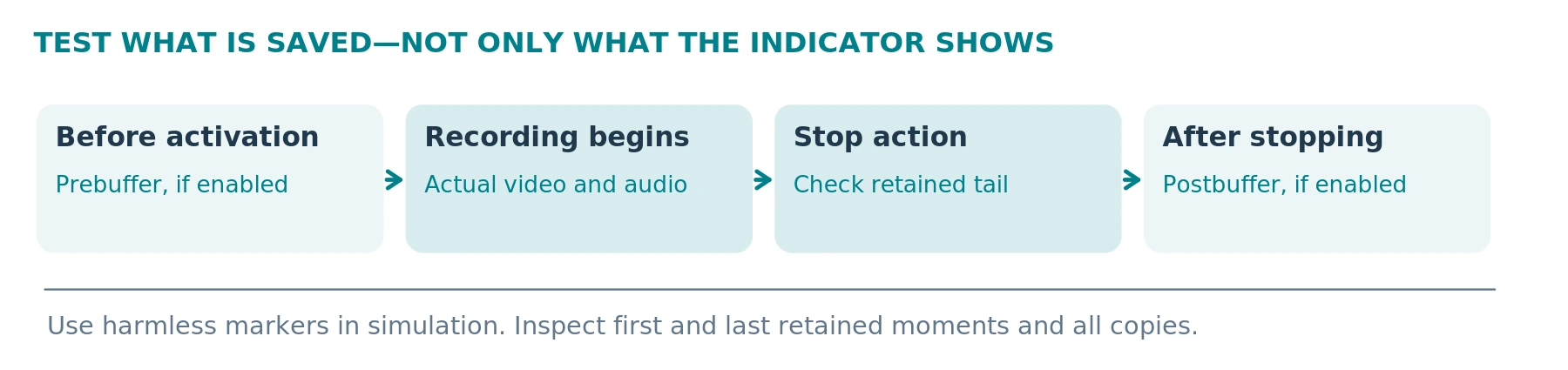
Ask for separate demonstrations of video, sound, pre-event buffering, post-event recording, automatic activation, and live transmission. Determine which settings can be enforced and who can change them.
Axis's system documentation provides a useful caution: optional postbuffering can continue capture after the stop action while the camera indicates that recording has stopped. Prebuffering and buffer audio also have separate settings. These are examples from a particular system, not standard functions of all body cameras. [9]
Use numbered cards before activation and after stopping in a simulated room. Inspect every retained segment and any live or cloud copy. Test restarts, reassignment, and profile changes—not only the configuration demonstrated by the salesperson.
For optional documentation, our recommendation is to disable unnecessary buffers, automatic triggers, and live services through supported controls. A separately justified incident requirement may call for different settings; approve and test it separately.
The ability to stop unwanted capture is an essential requirement, not a convenience feature. A camera that cannot meet the approved boundary should not enter that workflow.
Cleaning and Clinical-Space Compatibility Can Rule Out a Device
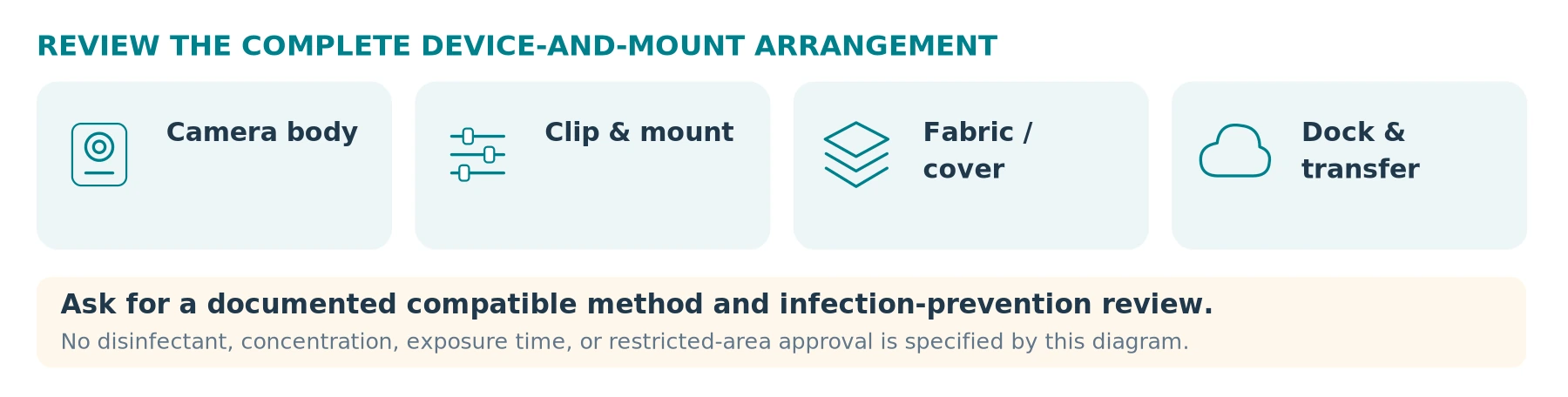
Give the infection-prevention team the exact camera, mount, clip, fabric attachment, cover, and docking arrangement—not just a photograph of the housing.
The US Centers for Disease Control and Prevention (CDC) core practices apply across healthcare settings, including care delivered at home. They call for appropriate cleaning and disinfection, adherence to product instructions, attention to material compatibility and contact time, and separation of clean and soiled equipment. These are general infection-control requirements, not approval of any body camera. [10]
Ask the manufacturer for a documented compatible cleaning method. Have the responsible team decide whether it meets the intended use and the organization's infection-control requirements. Define when cleaning occurs, who performs it, and where used equipment waits before processing.
Do not equate an IP water-resistance rating with tolerance for a disinfectant, repeated cleaning, or sterilization. Do not improvise bleach, immersion, steam, or ultraviolet treatment because the device looks rugged. If an appropriate compatible process cannot be established, choose another arrangement or exclude the device from that setting.
Test operation with approved clothing and personal protective equipment in simulation. Check for interference with hand hygiene, equipment access, safe movement, or patient contact. Do not change clinical practice or protective-equipment use merely to improve the camera angle.
Seek relevant specialist approval before taking equipment into MRI or other restricted clinical areas. A chest clip, magnetic attachment, battery, or wireless label is not evidence of suitability there.
A camera can pass the video test and still fail the clinical-environment assessment.
Cleaning and handling evidence to request
| Review item | Notes / evidence / responsible person |
|---|---|
| Exact camera, mount, cover, and dock | |
| Manufacturer instructions / specialist review reference |
Home Care Needs a Visit-Specific Plan
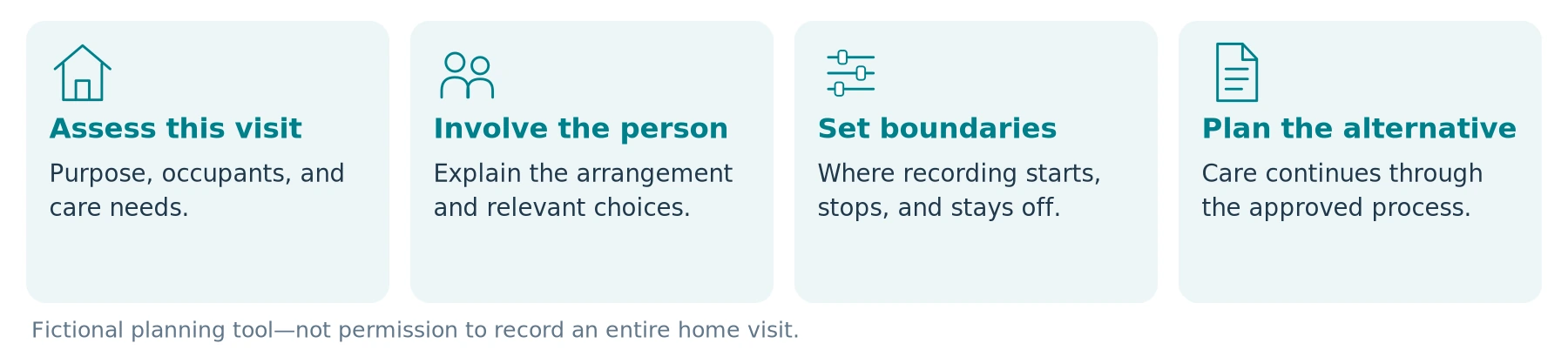
Assess the proposed visit before arrival. Separate a care record, worker-security concern, and family-update request; they do not automatically justify the same recording or recipients.
Confirm the service user's involvement, applicable decision-making arrangements, other occupants, approved start-and-stop points, and the alternative if recording does not proceed. Avoid a blanket instruction to record from the moment a worker crosses the threshold until departure.
HSE's community-worker guidance recommends assessing risks before home visits and establishing contact and response arrangements. A wearable camera does not turn an unsuitable lone visit into a suitable one. [2]
Consider a fictional planning exercise: a relative asks an agency to film every visit so they can check that care was delivered. The service user objects. The agency should not treat the payer's request as authorization; it should review the concern, decision-making rights, and alternatives such as appropriate visit records or agreed updates. This is a scenario for organizational review, not a ruling on an actual family dispute.
Likewise, a clinician-led proposal for a short functional demonstration is a different assessment from recording personal care. Use the approved clinical route, purpose, and information process—not a worker's personal camera account.
Do not send a whole visit to a relative simply because they requested reassurance. Establish what may appropriately be disclosed and through which authorized channel.
Visit-planning notes—use fictional or sanitized details
| Review item | Notes / evidence / responsible person |
|---|---|
| Recording purpose and proposed boundary | |
| Person involvement / alternative / escalation contact |
Map Every Place the Recording Can Go
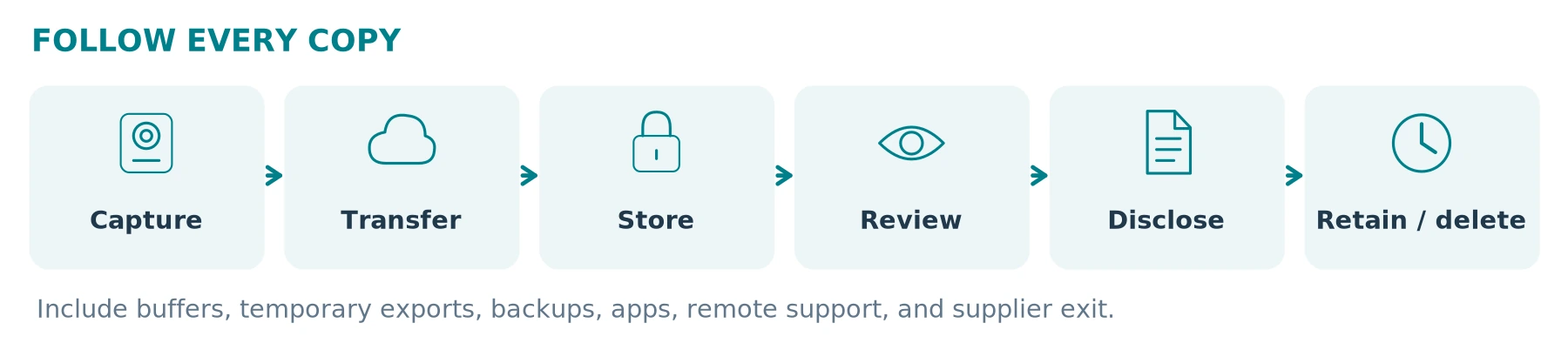
Before a pilot, draw the complete data path:
Authorized capture → protected transfer → controlled storage → approved review or disclosure → reviewed retention or deletion.
Add buffers, memory cards, docks, companion apps, temporary exports, backups, remote support, transcription, and cloud services. A file no longer visible on the camera may still exist elsewhere.
Use this proposed responsibility map:
| Stage | Required operational decision |
|---|---|
| Capture and assignment | Who wears which device, who controls its profile, and how permitted recording is identified. |
| Transfer and storage | Where files go, who confirms receipt, and how device data is handled after verified transfer. |
| Access and review | Which named roles can view which records, and how access and exports are logged and reviewed. |
| External disclosure | Who verifies authority, selects necessary material, protects other people, and records the recipient and purpose. |
| Retention and holds | Which schedule applies, who authorizes incident preservation, and when the need is reviewed. |
| Return, repair, or replacement | How recordings and accounts are protected before equipment or services change hands. |
Test named access, appropriate authentication, logging, and restoration of a backup. HHS identifies access controls, audit controls, authentication, and contingency planning among Security Rule requirements. An administrator password shared by the whole team is not a demonstration that those needs are met. [4]
Explain workforce use as well: do not quietly repurpose an incident-recording pilot into routine employee surveillance. Keep an appropriate route for reporting concerns about the program and review the applicable employment requirements.
Encryption Is Not a Complete HIPAA or GDPR Answer
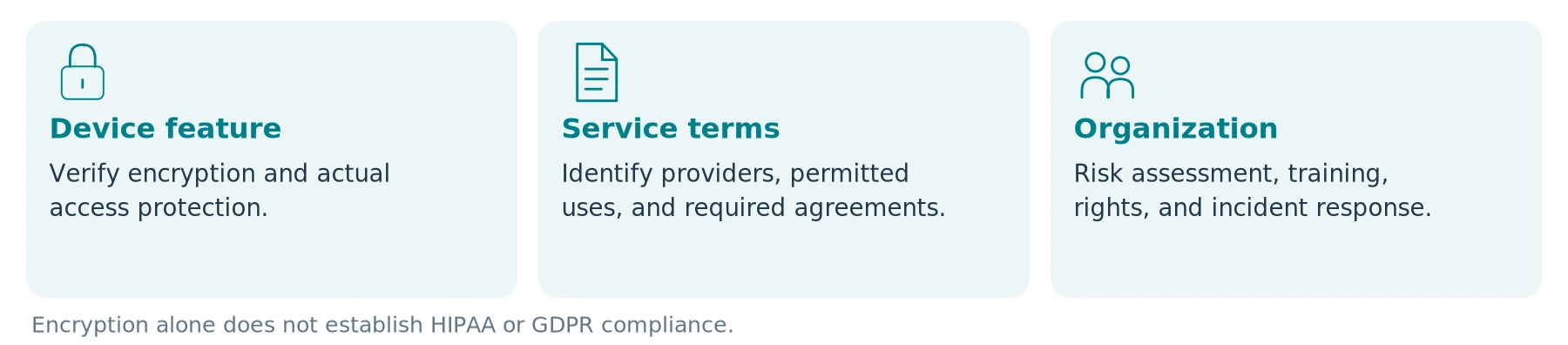
HHS states that its Office for Civil Rights (OCR) does not endorse, certify, or recommend particular technologies or products. Ask a supplier what its compliance claim actually covers: a feature, an independent assessment, a contract, or the complete service configuration. None substitutes for your own deployment assessment. [11]
For HIPAA-regulated organizations, a cloud provider maintaining electronic protected health information on their behalf is a business associate even when the information is encrypted and the provider lacks the decryption key. HHS explains that the required business associate agreement, or BAA, and other applicable safeguards still matter. [11]
Identify the actual suppliers and any subcontracted services. Do not require a hardware-only seller to sign an irrelevant contract merely because it sells cameras; assess whether the proposed activities involve handling protected information. Equally, do not overlook a hosting or transcription provider because it calls itself a technical service.
Obtain written terms for permitted processing, hosting and support locations, incident reporting, export, service termination, and return or deletion of data. Have the privacy team assess applicable international-transfer rules rather than treating a “local data center” label as the complete answer.
Our procurement recommendation is to prohibit unapproved secondary uses and AI processing. Do not upload patient footage to a public transcription tool, product-support chat, or model-training service to test its convenience. Any proposed secondary use needs its own assessment before data leaves the approved environment.
Supplier evidence register
| Review item | Notes / evidence / responsible person |
|---|---|
| Providers, support access, and service locations | |
| Access, export, secondary-use, and exit terms |
Decide Whether the Footage Is a Clinical Record, an Incident Record, or Both
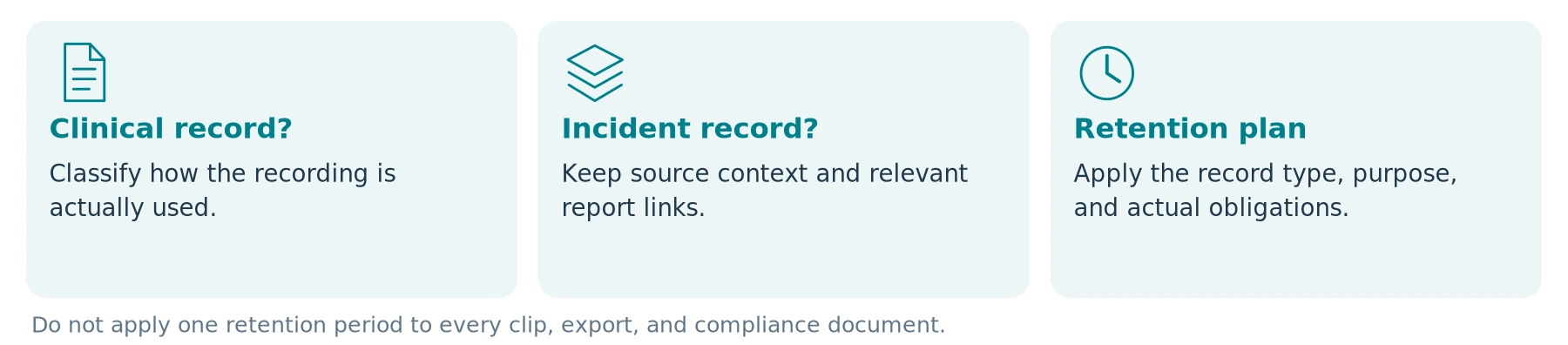
Have records-management and clinical leads classify the actual use. A folder called “security” does not settle the consequences when recordings are used in decisions about an individual's care.
The GMC states that recordings made as part of a patient's care form part of the medical record and require corresponding handling. Under HIPAA, HHS ties the individual access right to information in the designated record set, which includes records used to make decisions about individuals. Assess applicability rather than assuming all footage is either automatically included or automatically excluded. [8] [3]
Do not substitute footage for necessary clinical documentation, medication records, incident reports, or safeguarding referrals. Record what was directly observed, what later review showed, and any late start, blocked view, absent sound, or clock discrepancy.
Preserve relevant originals or documented native exports when required, and make authorized excerpts or redacted copies separately. Do not replace missing details with an AI reconstruction or treat a transcription as more certain than the source audio.
Do Not Apply One Retention Period to Everything
HHS explains that the HIPAA Privacy Rule does not itself prescribe medical-record retention periods; state law generally governs them. The Security Rule's six-year retention requirement for specified compliance documentation is a different obligation—not an instruction to keep every camera clip for six years. [12] [4]
Set schedules for the actual record types and applicable obligations, with documented incident or litigation holds and review points. Include temporary copies and backups. The ICO's body-worn guidance calls for purpose-based retention and disposal, not keeping footage simply because capacity permits it. [1]
Records-management decision notes
| Review item | Notes / evidence / responsible person |
|---|---|
| Record classification and responsible lead | |
| Schedule basis / hold review / copies included |
Prepare for Requests, Accidental Capture, and Lost Devices
Route patient, service-user, family, staff, police, and insurer requests to the designated process. Verify identity and authority, scope the material, preserve what must be preserved, and respond within the applicable requirements. Staff should not promise instant deletion, unrestricted access, or automatic disclosure to every requester.
The ICO's surveillance-governance guidance addresses locating requested footage, controlling disclosures, and redacting third-party images and sound where necessary. Test those capabilities before relying on them. A blurred face alone should not be assumed to remove identifying speech, names, surroundings, or other information. [13]
For accidental recording in a sensitive area, a lost camera, or a misdirected upload, prioritize immediate safety and notify the responsible clinical and privacy contacts promptly. Follow the incident plan to contain further exposure and preserve necessary logs. Do not circulate the footage to explain the error or erase it to conceal what happened.
HHS explains that impermissible uses or disclosures fall within the breach-notification framework, with specified exceptions and risk-assessment provisions. Have the privacy lead determine any required notifications; do not assume that a manufacturer's encryption label settles the question. [14]
Do not publish patient encounters to defend staff or the organization online. Handle complaints, safeguarding concerns, and evidence requests through appropriate processes, even when a short public clip appears favorable to one side.
Simulated request or data incident—discussion log
| Review item | Notes / evidence / responsible person |
|---|---|
| Fictional scenario and responsible recipient | |
| What authority or scope requires checking? | |
| What further exposure must be prevented? | |
| What logs, notices, or escalation require review? |
USE SANITIZED DETAILS Do not enter real patient identifiers, footage links, recovery credentials, or private contact details in a general product-review worksheet.
Start with Simulation, Not an Unannounced Patient Trial
Our recommended first stage uses consenting staff acting fictional roles, a mock care space, and invented paperwork. Do not use real patient records, actual intimate care, or an unsuspecting resident to make a demonstration look realistic.
Obtain the appropriate review before any later operational pilot. Ask the responsible governance team whether a research or other formal review is required; calling a project a “pilot” does not answer that question.
The following is a proposed acceptance plan, not a clinical study or hands-on product result:
| Test | What to demonstrate | A reason to stop and revise |
|---|---|---|
| Purpose and alternatives | Compare the proposed camera with existing reporting or a less intrusive method. | No necessary additional information or defensible purpose emerges. |
| Information and decision-making | Rehearse explanation, objections, communication support, and representative questions. | Staff cannot explain the arrangement or provide the promised alternative. |
| Actual recording boundaries | Check first and last retained moments, audio, buffers, and transition into an excluded mock area. | Unwanted capture cannot be reliably prevented or managed. |
| Clinical-space handling | Use the reviewed mount, clothing, protective equipment, cleaning, and clean/used storage process. | The setup interferes with care or lacks an acceptable handling method. |
| Duration and reassignment | Reproduce the approved recording pattern and next-user preparation. | Incorrect profiles, missed recording, or previous-user access remain unresolved. |
| Files, rights, and failure | Retrieve a fictional incident, restrict access, prepare an appropriate copy, and rehearse loss or upload failure. | The organization cannot locate, protect, disclose, or recover the required material. |
Record the exact model, firmware, settings, mount, test conditions, results, and responsible reviewer. Mark essential requirements Pass, Fail, or Unverified. An unverified privacy or cleaning requirement is not a minor deduction that higher resolution can offset.
For an approved live pilot, review patient and staff experience, unnecessary capture, interruptions to care, retrieval effort, and complaints as well as technical operation. A small before-and-after incident count cannot establish that cameras caused a change in violence or care quality.
ACCEPTANCE STATUS PASS / FAIL / UNVERIFIED. A simulated pass is not clinical validation, infection-control approval, or authorization for a real-patient trial.
When Should You Pause or Decline Deployment?
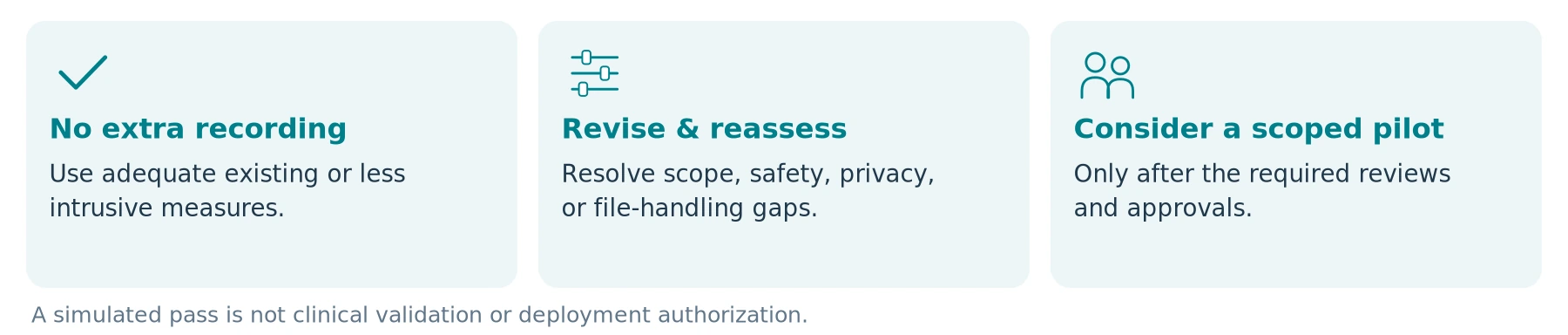
Do not proceed while the purpose or lawful arrangement remains unresolved. Pause when the proposed method pressures people into optional recording, cannot handle objections or capacity questions appropriately, or expands routine capture into intimate care without a separately justified plan.
The same applies when cleaning compatibility is unestablished, an attachment interferes with care, footage enters an uncontrolled personal account, required supplier terms are unavailable, or nobody can operate the access and retention process.
Use one of three recorded outcomes: no additional recording needed; revise and repeat the assessment; or consider a narrowly scoped pilot after the required approvals. None is a declaration that the product is universally suitable for healthcare.
Budget for the Whole Arrangement
Ask for a quote only after defining the setting, role, purpose, capture limits, required controls, and file-management needs. Use sanitized descriptions; an initial product inquiry should not contain patient images, health records, home addresses, or real incident footage.
Include the necessary mounts, approved cleaning and replacement arrangements, charging and transfer equipment, software, protected storage, training, review and redaction work, support, and eventual data migration or disposal. Keep a required but unquoted service marked Unverified, not free.
The companion guides Do Body Cameras Require a Subscription? Fees Explained and How Much Does a Body Camera Cost? A Buyer's Budget Guide explain the underlying cost checks. Here, a lower purchase price does not compensate for an arrangement the organization cannot lawfully or safely operate.
The Bottom Line
For healthcare and home care, the first purchase decision is whether recording belongs in the proposed workflow at all. Separate hospital-security tasks, clinical recordings, and home visits; test alternatives; involve the responsible specialists and the people affected.
Where a justified proposal remains, verify boundaries, cleaning, access, retention, and staff competence through an authorized process. Preserve necessary care and assistance regardless of whether the camera is working.
For a SpikeCam inquiry, request evidence for the exact model and complete configuration. This guide does not establish clinical suitability, diagnostic performance, infection-control compatibility, MRI safety, HIPAA or GDPR compliance, or any unverified feature of a SpikeCam product.
Choose privacy and appropriate care first. Consider recording only when the full arrangement can meet those requirements.
Simulation and Evidence Worksheet
Use consenting staff, invented records, and a mock care space. Keep this blank until a reviewer records actual evidence; this is not an official form or clinical approval.
Test identity and configuration
| Review item | Notes / evidence / responsible person |
|---|---|
| Fictional exercise reference / date / reviewers | |
| Model, firmware, profile, mount, and accessories | |
| Setting, intended purpose, and less intrusive alternative |
| Essential check | Status | Evidence / limitation / next action |
|---|---|---|
| Information, choices, and support | Not tested | |
| Video / audio / buffer boundaries | Not tested | |
| Cleaning, handling, and equipment safety | Not reviewed | |
| Duration, reassignment, and access | Not tested | |
| Retrieval, disclosure, backup, and failure | Not tested |
Record the next assessment step
| Review item | Notes / evidence / responsible person |
|---|---|
| Decision: no extra recording / revise / consider scoped pilot | |
| Unresolved issues, owners, and follow-up dates |
ESSENTIALS FIRST Do not let image quality compensate for an unresolved privacy, clinical, cleaning, or equipment-safety requirement.
References and Editorial Status
The following source links and the September 26, 2026 reference date are carried over from the supplied manuscript. This illustrated edition does not constitute independent clinical, infection-prevention, or jurisdiction-specific legal review.
01 ICO — Body Worn Video (BWV)
02 HSE — Managing the risk of violence and aggression in health and social care: Do
03 HHS — Summary of the HIPAA Privacy Rule
04 HHS — Summary of the HIPAA Security Rule
05 ICO — Special category data
06 European Commission — Legal grounds for processing data
07 ICO — When is consent appropriate?
08 GMC — Making and using visual and audio recordings of patients (PDF)
09 Axis — Body worn solution user manual
10 CDC — Core Infection Prevention and Control Practices for Safe Healthcare Delivery in All Settings
11 HHS — Guidance on HIPAA and Cloud Computing
12 HHS — Does HIPAA require covered entities to keep medical records for any period of time?
13 ICO — Governance: post-deployment
14 HHS — Breach Notification Rule
Article status note
Sources checked September 26, 2026. This is a general assessment guide, not medical or legal advice, an approved clinical policy, or deployment authorization. US, UK, EU, and professional references retain their stated scopes; the cited ICO guidance is marked as under review. Manufacturer references illustrate documented settings, not healthcare approvals or test results. Tables and exercises are proposed editorial tools. No reduction in violence, improvement in care, evidentiary outcome, or unverified SpikeCam capability is guaranteed.
Related articles

Body Cameras for Hospitality and Event Staff: What to Consider
Assess selected roles, venue conditions, recording boundaries and a reliable handover of footage.
Body Camera Buying Guide: How to Choose the Right One
Choose a camera around recording controls, battery life, file access and your actual working routine.
Body Camera Uses: Find a Guide for Your Work or Everyday Needs
Find guidance for your role, from private security and delivery work to personal recording and care settings.
