Body Cameras for Retail Staff: Do You Need Them Alongside CCTV?
Assess the gaps beyond existing CCTV and plan a controlled recording process for selected retail roles.
Editorial guidance, not legal advice or a model-specific performance promise. Check the rules and requirements that apply to your location and use.
The starting point
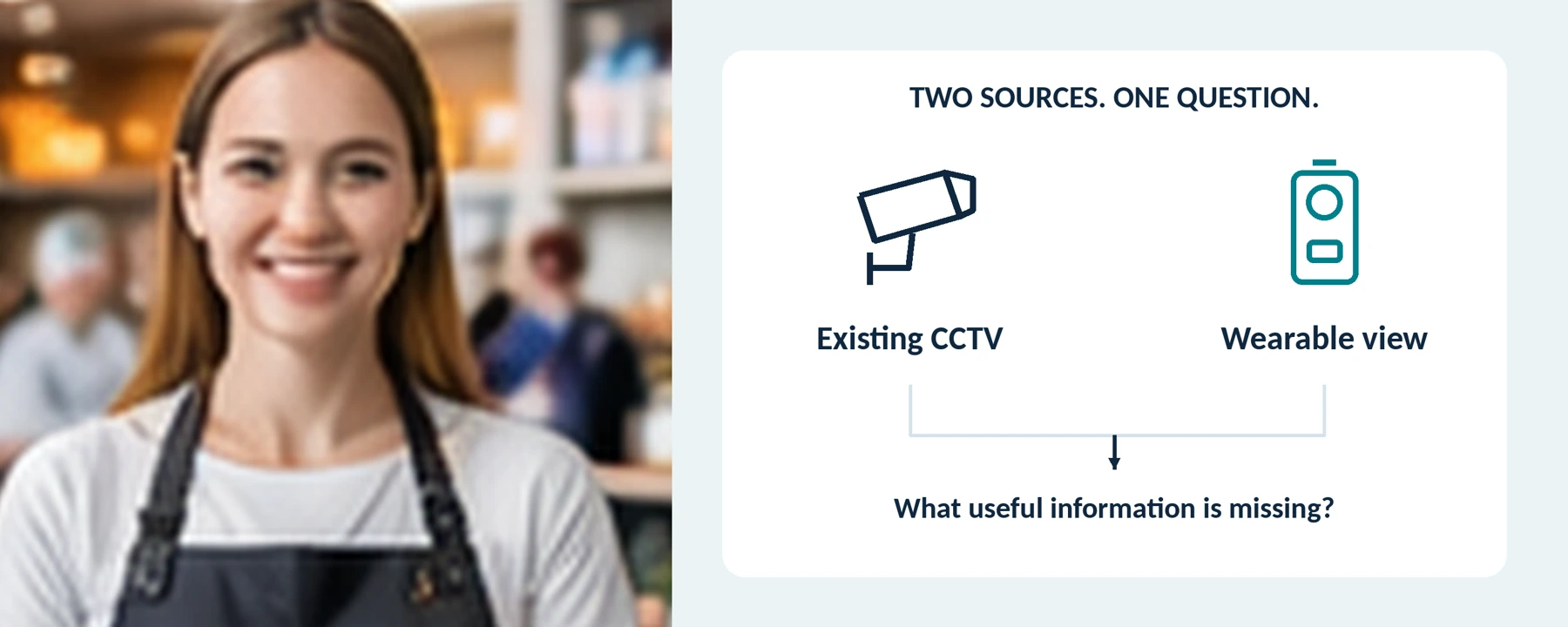
What would we need to understand about an incident that our current cameras and reports cannot show?
Read the guide before filling the working forms. A sensible result may be better use of existing CCTV, a limited wearable-camera trial, or no additional equipment.
Not every store with CCTV needs body cameras. Consider them when an assessment identifies a specific recording need that the existing setup does not meet—and a trial shows that wearable recording can address it appropriately.
For a store owner or manager, the useful question is not “Would another camera give us more footage?” It is:
“What would we need to understand about an incident that our current cameras and reports cannot show?”
Start with the store layout, the jobs people perform, and the way recordings are retrieved. A suitable outcome may be cameras for selected roles. It may also be a better camera angle, clearer procedures, or no additional equipment.
The UK’s Health and Safety Executive includes CCTV and body-worn cameras among possible workplace controls, alongside layout, staffing, communication, and training. It emphasizes using an appropriate combination rather than relying on one measure. [1]
This guide helps retailers compare those options. It includes a coverage assessment, a way to connect two recordings of the same event, and a proposed pilot. It does not promise reduced theft, fewer confrontations, or a particular complaint outcome.
Start by Checking What Your CCTV Already Does
For this comparison, CCTV means the store’s fixed security-camera arrangement, including its recording and playback system. Do not judge it only from the live picture on a monitor.
Ask an authorized colleague to retrieve a harmless test event from a specific location and time. Check whether the saved file contains the required detail, whether its time information is correct, and whether the appropriate person can export it.
Then describe the unresolved problem precisely. Is the view obstructed? Is the event outside the relevant frame? Is sound necessary but unavailable or inappropriate to collect? Or does useful footage exist but nobody knows how to retrieve it?
These are different problems. Our recommendation is to fix a retrieval or maintenance problem before buying a second recording system that may inherit the same weakness.

WORKING FORM / BASELINE RETRIEVAL CHECK
| Check | Finding or evidence reference |
|---|---|
| Test location and staged time | Not specified |
| Saved detail and authorized export | Not specified |
| The unresolved need, if any | Not specified |
Map the store’s existing coverage
Make a Simple Store Coverage Map
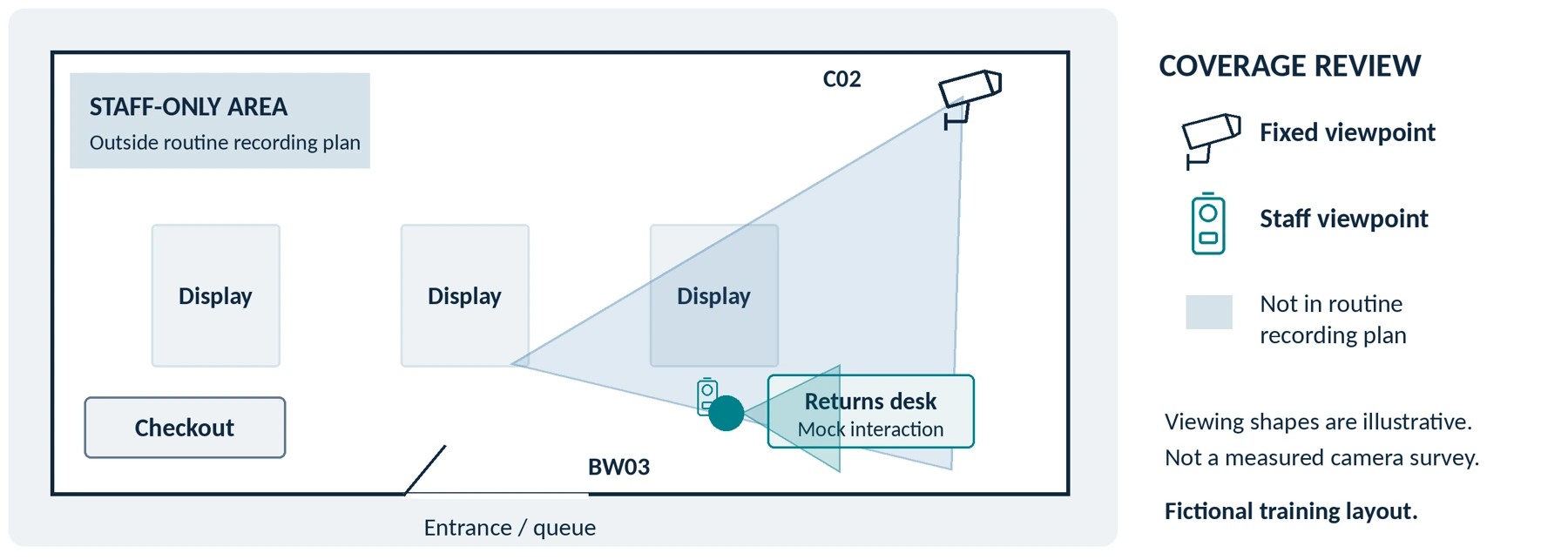
Sketch the entrance, checkout, returns desk, main aisles, and staff-only areas. Mark each existing camera and the task its view is intended to document. Keep real security layouts within the authorized team; use a simplified fictional layout for demonstrations.
Use this worksheet to identify a gap rather than assume one:
| Store location or task | Check the existing arrangement | Question for a body-camera trial |
|---|---|---|
| Entrance and queue | Can the saved view show the relevant arrival, movement, and interaction? | Would a staff-level view add necessary detail, or would a layout or camera adjustment solve the problem? |
| Checkout and self-checkout assistance | Can the relevant action be reviewed without unnecessarily exposing payment information? | Can a worn camera capture the interaction without focusing on PIN entry, screens, or unrelated shoppers? |
| Returns and customer-service desk | Does the view cover the exchange and the surrounding sequence? | Would an appropriately activated closer view add information that matters? |
| Sales floor and aisle ends | Does normal merchandise placement obscure the required area? | Is this an actual mobile-interaction need, or a fixed-view problem to correct first? |
| After closing | What equipment covers the premises when no employee is present? | An employee-worn camera is not a substitute for unattended coverage when nobody is wearing it. |
A body camera should not be the default solution to every blind spot. Check lighting, displays, positioning, and working arrangements as alternatives. HSE explicitly includes visibility, lighting, queues, and staffing in its workplace-control guidance. [1]
What Can a Body Camera Add That CCTV Does Not?
Think in terms of a different viewpoint, not a complete or automatically superior record.
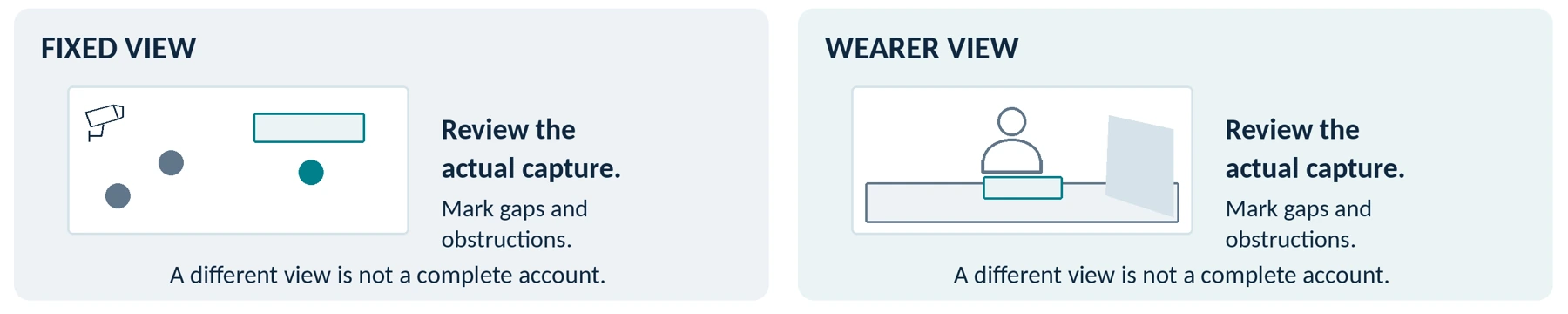
In a fictional training exercise, suppose a fixed camera shows the queue and returns desk. A staff member’s body camera, activated under the exercise rules, records from the employee’s position. The first view may help a reviewer understand movement around the desk; the second may reveal details of the exchange—provided its lens and microphone actually capture them.
Now suppose the employee turns toward a shelf. The wearable view changes, while the fixed view may still show the counter. Alternatively, an item held in front of the employee may block the worn lens. Review both files to determine what was captured rather than assigning a winner in advance.
Two partial views do not automatically create a complete account. Record late activation, obstructions, missing sound, and any uncertainty. Neither camera should be assumed to reveal a person’s intentions or an action outside its frame.
Closer recording also changes the privacy assessment. The ICO notes that body-worn video can capture people and sound at close range and can be more intrusive than conventional CCTV. That potential additional detail needs a defined purpose, not just an available microphone. [2]
Which Retail Employees Should Wear Cameras?
Do not start with “one camera per employee.” Start with the role, the approved recording purpose, and the circumstances in which the device would be used.
Returns and customer-service staff: test the actual counter height, clothing, reaching movements, and conversation position. Ask whether an incident-specific recording need exists beyond the transaction record and fixed view.
Duty managers: assess the locations where they are called to assist, how they would collect or already carry a device, and what a late arrival would leave unrecorded. Do not assume a manager’s camera captures the beginning of an event elsewhere in the store.
Checkout and sales-floor staff: distinguish ordinary transactions from situations meeting your recording procedure. Wearing a camera should not quietly become a requirement to record every purchase or conversation.
Store security or loss-prevention personnel: evaluate their authorized duties and handover arrangements separately from those of general retail employees. The companion guide Body Cameras for Security Guards: What to Look For covers the security-role assessment in more detail.
Calculate simultaneous users only after these decisions. For shared equipment, include collection, charging, file handling, cleaning under the manufacturer’s instructions, and the next assignment. Count usable devices, not simply units in a cupboard.
Agree on the Recording Rules Before a Live Trial

Define When Recording Starts—and When It Ends
Write down the purpose, activation criteria, stopping procedure, excluded spaces, audio setting, and who answers questions. Define behavior in the procedure, not vague categories such as “customers who look suspicious.”
Do not use a routine refund request or dissatisfaction as an automatic reason to record someone. Nor should staff remain in an unsafe interaction to obtain footage. Follow the store’s response and assistance procedures; do not treat wearing a camera as permission to search, detain, or pursue anyone.
For UK organizational use, the ICO requires justification of body-worn recording and a data protection impact assessment. Its guidance says continuous recording needs strong justification and addresses privacy information and separate audio control. The page is currently marked as under review. [2]
Our recommendation is to keep bathrooms, fitting rooms, and private staff spaces outside the routine recording plan, with clear procedures to prevent accidental capture. Escalate exceptional situations to the responsible manager rather than assuming a general camera policy authorizes recording everywhere.
Include Employees in the Plan
Explain whether footage is collected for incident review, what access managers have, and how staff can raise concerns. Do not introduce a staff-safety pilot and quietly repurpose the recordings to score every conversation or monitor breaks.
The ICO’s worker-monitoring guidance requires employers considering video or audio monitoring to assess its necessity and inform workers about its nature and purpose. It also cautions that continuous monitoring of individuals is difficult to justify in most circumstances. [3]
Consult affected staff and their representatives, and check applicable employment and consultation requirements. Keep a route for reporting incidents that were not captured or that involve a supervisor; a missing clip should not prevent a concern being raised.
Check the Rules for Your Location
United States: check relevant state and other applicable rules, particularly for conversations. California Penal Code section 632 addresses confidential communications recorded without all-party consent and includes qualifications about what is confidential. It does not provide a single answer for every interaction in every US store. [4]
European Union: the EDPB’s video-device guidance addresses defined purposes, necessity, alternatives, security, and retention. Review it alongside national recording and employment requirements rather than assuming that an existing CCTV installation authorizes an additional use. [5]
Review customer-facing information too. Do not assume a general CCTV sign adequately explains staff-worn video and audio. Have the responsible person determine the necessary notices, announcements, and any consent requirements; giving notice and obtaining legally required consent are different tasks.
This is purchasing and planning guidance, not a determination that a specific deployment is lawful. Resolve uncertain uses with qualified local advisers before an operational trial.
Test Features in the Store, Not Only on a Specification Sheet

Clothing, Counters, and Normal Movement
Try the complete camera and mount on the actual polo shirt, apron, jacket, or other uniform. Rehearse scanning a training item, reaching across the counter, bagging, turning, bending, and using a radio.
Review the saved view. Check that clothing, hair, lanyards, arms, and merchandise do not block the necessary scene. Use fictional receipts and mock payment details; do not conduct the test with customers’ cards or identity documents.
Do not choose a mounting position solely because the device looks neat there. The relevant result is usable footage during the task without making the work awkward or unsafe.
Activation Staff Can Recognize
Ask a trained employee to distinguish “ready” from “recording” and to recognize a failure warning. Test activation from the state in which the camera will actually be carried.
For example, the AXIS W110 manual documents separate readiness and recording indicators, along with vibration and audible feedback. Those are features to verify on your candidate, not assumptions about every body camera. [6]
When pre-event footage is necessary, test that requirement specifically. Axis documents configurable prebuffering, separate buffer-audio settings, and restrictions such as incompatibility with its standby mode. Do not expect an unsupported or inactive buffer to recover the lead-up. [7]
Speech, Movement, and Store Lighting
Use consenting participants and representative background noise. Test speech from both sides of the counter, not just the wearer’s voice. Check microphone settings before and after the exercise.
Include a person moving near a bright entrance and through a darker aisle. Axis’s image-quality guidance explains that slow shutter speeds can blur moving subjects even when a static view appears sharp. It also discusses flicker from artificial lighting. Inspect the actual file under your store’s conditions rather than choosing by resolution alone. [8]
Readiness Across the Assignment
Define the time the camera must remain ready and its expected recording pattern. That is different from automatically demanding continuous video of the entire shift.
Test the intended settings through the required period, including an activation near the end. Axis identifies battery capacity and available storage as separate operating limits; settings, wireless activity, and conditions affect performance. A charging light or a short opening test does not answer the whole requirement. [6]
Check export time, cleaning instructions, replacement mounts, battery servicing, and the response to a failed unit. Keep these practical needs in the quote rather than treating them as future details.
Does It Need to Connect to Your Existing CCTV System?
Using two recordings together is not the same as integrating the devices. Describe which of these arrangements you actually need:
Separate recordings, one incident reference. An authorized reviewer retrieves the CCTV and body-camera files from their respective systems and connects them through an incident index. Test whether this process meets your access, security, and workload requirements.
A shared review or evidence platform. Ask which file types it accepts, whether original quality and metadata are retained, and how permissions and deletion work. Demonstrate the complete export-and-import process.
Integrated live viewing. This requires a specifically supported configuration. Motorola documents live body-worn and fixed-camera video within one video-management system for its VB400 solution. That example is not a compatibility promise for your recorder or another brand. [9]
Request the exact models, software versions, licenses, network arrangements, and behavior when the connection fails. A Wi-Fi label does not establish any of those integrations.
Also keep recording, remote viewing, and requesting assistance separate. Someone must be responsible for receiving and responding to an alert; a stored file or live-video capability alone is not that response plan.

WORKING FORM / COMPATIBILITY CONFIRMATION
| Item to verify | Supplier or administrator confirmation |
|---|---|
| Existing CCTV model / software | Not specified |
| Proposed camera / software | Not specified |
| Chosen arrangement and required licenses | Not specified |
| Export, access and connection-failure test | Not specified |
Use Confirmed, Not supported or Unverified. Attach a specific manual, written response or trial result to each confirmed requirement.
Connect the Two Recordings to the Same Event

Our suggested retrieval process is:
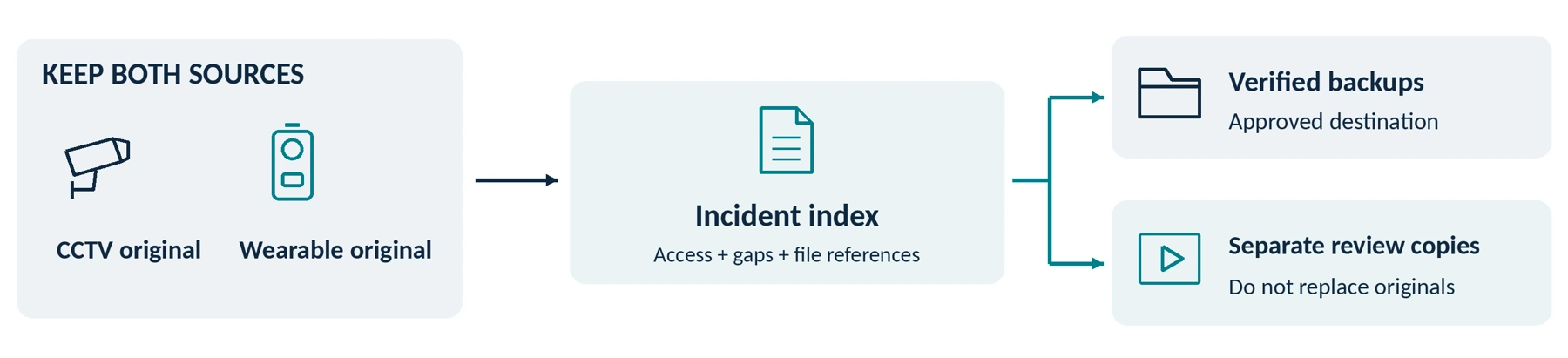
Incident reference → location and time → relevant CCTV channels → assigned body camera → verified exports and notes.
Record which person used the wearable device, who retrieves each source, and any known gaps. Use a relevant transaction reference only where necessary and authorized; do not duplicate full payment or customer records in an incident filename.
Check the Clocks Before You Need Them
Compare dates, time zones, and clock accuracy across the systems. The ICO’s surveillance guidance specifically calls for checking recorded date and time, including seasonal clock changes. [10]
The following is a fictional training example, not an actual incident or a result from a named camera. All times use the same date and time zone, and the offset has been checked during the exercise.
| Source | Time shown for the same staged action | Note for the reviewer |
|---|---|---|
| Reference clock | 14:20:30 | Time used for the controlled exercise. |
| Fixed camera C02 | 14:20:30 | Matches the reference at this check. |
| Body camera BW03 | 14:18:30 | Two minutes slow at this check; preserve and explain the discrepancy. |
In that example, searching both systems at exactly 14:20:30 would not compare the same action. Correct future settings through the supported procedure, but preserve the original file and document what you found. Do not silently rewrite an original timestamp to make sources appear synchronized.
For a real incident, do not assume a later clock check proves the exact historical offset. Record how and when it was checked, preserve enough relevant context, and flag uncertainty for the reviewer.
Preserve Context, Not Only the Most Dramatic Clip
Identify relevant footage from before, during, and after the event across the necessary sources. Keep material that may clarify or contradict an initial account, not just clips that support it.
Review each original source before constructing a combined presentation. Keep edited, redacted, or side-by-side review copies separate, and note missing audio or unmatched time. Do not present a reconstructed sequence or AI-generated detail as original capture.
A person’s report should distinguish what they directly observed from what they later saw on video. A blank view or late start is a recording limitation, not proof that an unrecorded event did not occur.
Plan Retention, Access, and Requests Across Both Systems
Name the person responsible for preserving relevant CCTV and body-camera material. Check each system’s deletion or overwrite schedule instead of assuming they match. An incident saved in one system does not preserve the other system’s files.
Set purpose-based routine retention and a documented process for justified incident holds and their review. The EDPB guidance requires retention to be necessary for the particular purpose and notes that national provisions may also apply; it does not establish a universal retail retention period. [5]
Test who can view, export, share, and delete recordings. Include how a lost camera, failed transfer, or departed employee is handled. Do not accept shared administrator credentials as the only way everyone gets access.
Have the designated reviewer verify exported files and approved backups. Where a system uses proprietary files or accompanying records, establish how the intended recipient will open them without discarding the originals.
Customers and employees may ask for access or raise objections. The ICO’s governance guidance addresses recognizing requests, locating relevant footage, controlled disclosure, and redacting other people where necessary. Train staff to refer requests to the responsible person rather than promising immediate deletion or copying an entire store recording. [11]
Do not upload an alleged shoplifting or refund incident to social media as routine loss-prevention practice. The same ICO guidance warns that disclosing organizational surveillance to an indefinite online audience may be inappropriate or unlawful. Reporting through an authorized channel is a different decision. [11]
WORKING FORM / RESPONSIBILITY CHECK
| Responsibility | Named owner / procedure reference |
|---|---|
| Preserve relevant files from both systems | Not specified |
| Review access and disclosure requests | Not specified |
| Approve retention review and deletion | Not specified |
Rehearse the Store’s Before–During–After Routine
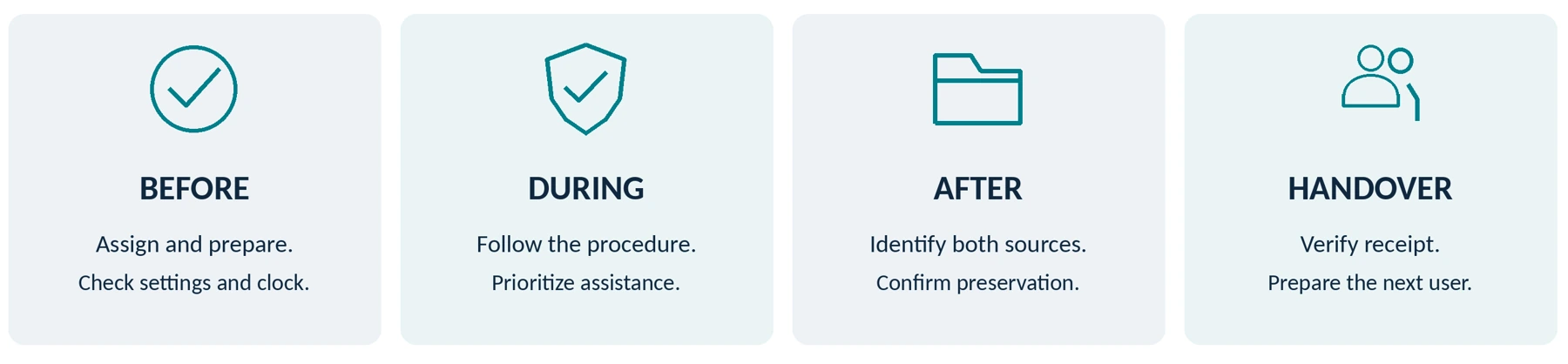
Before use: assign the device, confirm the approved settings, check charge and storage, and verify the lens, clock, and mount. Explain the activation criteria and the separate route for assistance. Keep a record of which employee has which camera.
During an incident: follow the store’s training, provide required information as appropriate, and prioritize safety and assistance over camera operation. Do not encourage employees to chase people or prolong conflict to get a better view. Report recording failures without delaying an urgent response.
Afterward: support affected staff, create the incident reference, identify both recording sources, and have the responsible reviewer confirm preservation and playback. Report known gaps rather than asking anyone to recreate the encounter.
HSE recommends supporting affected workers, recording and reporting incidents, and reviewing whether further controls are needed. That work remains important whether the event has one recording, two recordings, or none. [12]
At handover: confirm that files reached the approved destination and that the device is ready for the next user. Do not confuse returning the camera with successfully transferring its recordings.
WORKING FORM / TWO-SOURCE HANDOVER
| Field | Complete within the approved reporting process |
|---|---|
| Incident reference / staged exercise | Not specified |
| CCTV channels and wearable device | Not specified |
| Known gaps / clock discrepancy | Not specified |
| Recipient, playback and preservation status | Not specified |
Run a Pilot That Tests the Added Value

Begin with a small, authorized trial covering the selected roles. Use consenting staff, fictional transactions, and a controlled setting before operational use. Do not stage an unannounced theft or confrontation to test customer or employee reactions.
Document the existing setup first, then repeat comparable exercises with the proposed additional device. The important question is what useful information or practical capability it adds—not how many hours it records.
This is a proposed test plan, not a report of hands-on results.
| Trial | What to compare | Evidence to keep |
|---|---|---|
| Returns-desk exercise | Existing CCTV and reports versus the same task with authorized wearable capture. | What each source shows, what remains missing, and whether the extra recording serves the stated purpose. |
| Uniform and counter test | Normal reaching, bagging, sitting or standing, and clothing changes. | View obstructions, awkward operation, and approved mounting adjustments. |
| Light and sound test | Movement, entrance glare, store lighting, and normal background sound. | Original clips and reviewer observations, not promotional samples. |
| Assignment-length test | The planned readiness and activation pattern over the required duration. | Missed activations, warnings, storage limits, and end-of-assignment operation. |
| Two-source retrieval | A reviewer who did not stage the exercise finds both recordings from an incident reference. | Clock discrepancies, missing files, playback, permissions, and measured handling time. |
| Privacy and handover | Excluded spaces, mock customer requests, a reported device failure, and the next user. | Whether the procedure is understood and whether unresolved risks stop the rollout. |
Mark essential requirements Pass, Fail, or Unverified. Staff discomfort, unnecessary capture, or inability to handle requests are findings to address—not inconveniences to omit from the results.
Do not use the number of reported incidents alone as proof that cameras worked. A change could reflect reporting practices, staffing, opening hours, visitor numbers, or chance. A simple before-and-after count cannot isolate the camera’s effect.
Use the pilot to establish operating performance and practical value. It does not justify a guaranteed percentage reduction in theft, abuse, complaints, or insurance costs.
Budget for the Additional System—not Just the Devices
Request a complete quote for the roles selected: cameras, compatible mounts, necessary charging and transfer equipment, storage, software, support, and any integration work.
Include staff time for assignment, retrieval, review, redaction, and responding to requests. Measure those tasks during the pilot rather than entering an invented time saving.
Compare this with the cost of correcting the identified weakness in the existing arrangement. Keep the historical cost of your already-owned CCTV separate from the additional cost of this decision, while including any required upgrades or new recurring charges.
Use Do Body Cameras Require a Subscription? Fees Explained and How Much Does a Body Camera Cost? A Buyer’s Budget Guide for the detailed fee checks. A camera-only price is not a complete quote when the proposed use depends on extra equipment or services.

WORKING FORM / ADDITIONAL-COST COMPARISON
| Additional requirement | Improve existing setup | Proposed wearable setup |
|---|---|---|
| Hardware, mounts and installation | Pending: Not specified | Pending: Not specified |
| Charging, transfer and connections | Pending: Not specified | Pending: Not specified |
| Storage, software and recurring services | Pending: Not specified | Pending: Not specified |
| Measured staff handling time | Not measured: Not specified | Not measured: Not specified |
| Support and maintenance | Pending: Not specified | Pending: Not specified |
| Total for the same comparison period | Pending: Not specified | Pending: Not specified |
Comparison period: ____________________ Currency / quote date: ____________________
Do not enter zero for unquoted required items. Keep staff-time estimates separate from invoices and record any assumptions.
Your Retail Deployment Decision Sheet
Before requesting a recommendation, summarize the country or state, store type, existing CCTV arrangement, selected roles, recording purpose, audio requirements, wearing conditions, file destination, and budget. Keep security-sensitive layouts and real customer footage out of an initial inquiry.
Use the assessment to choose among these outcomes:
| Finding | Suggested next step |
|---|---|
| The existing CCTV and reporting process already meet the defined need. | Keep the arrangement, maintain it, and do not add cameras without another demonstrated reason. |
| The main problem is a blocked view, poor retrieval, inadequate lighting, or an unclear response procedure. | Improve that specific issue and reassess before expanding wearable recording. |
| Selected roles have a justified need that a trial addresses, with workable handling and acceptable privacy conditions. | Consider a limited deployment using the tested model and configuration, then review actual use. |
| Permission, privacy, usability, or file-handling requirements remain unresolved. | Pause deployment. Resolve the gap or consider an alternative rather than treating uncertainty as approval. |
These are editorial decision criteria, not a certification of a store or product. Mark unknown answers as Unverified, and request model-specific evidence from the supplier.
WORKING FORM / RETAIL NEEDS SUMMARY
| Requirement | Your confirmed requirement |
|---|---|
| Location, store type and selected roles | Not specified |
| Recording purpose and identified gap | Not specified |
| Audio, privacy and approval process | Not specified |
| Existing CCTV and intended file destination | Not specified |
| Wearing conditions and assignment pattern | Not specified |
| Budget and unresolved requirements | Not specified |
Do not include security-sensitive layouts, actual payment information or identifiable customer footage in an initial product inquiry.
The Bottom Line
Body cameras can be worth evaluating alongside CCTV when they address a specific, justified gap in a store’s incident-recording process. They are not an automatic requirement for every shop or every employee.
Start with existing coverage and the tasks staff perform. Test the additional view, agree on appropriate use, and prove that the right person can retrieve and handle both recordings together. Keep staff safety and fair treatment of customers central to the decision.
When discussing a SpikeCam proposal, describe the requirements above and ask which ones the exact model, accessories, and services support. This guide does not imply that every SpikeCam model offers pre-recording, encryption, live viewing, centralized management, or compatibility with an existing CCTV system.
Add a camera only when the complete arrangement provides a benefit you can explain, use appropriately, and verify.
WORKING FORM / TRIAL ACCEPTANCE RECORD
| Essential check | Pass / Fail / Unverified | Evidence / unresolved action |
|---|---|---|
| Purpose and local approval | Not specified | Not specified |
| Actual wearing and capture | Not specified | Not specified |
| Required operating period | Not specified | Not specified |
| Two-source retrieval and access | Not specified | Not specified |
| Privacy, requests and handover | Not specified | Not specified |
| Complete cost and support | Not specified | Not specified |
Reviewer / role: ____________________ Date: ____________________
Decision: Keep existing / Improve first / Limited deployment / Pause
Open actions and review date: __________________________________________________
Sources checked September 24, 2026. Product examples describe documented capabilities, not rankings or hands-on results. The store scenarios, clock example, pilot, and decision sheet are editorial tools rather than real incident records or measured outcomes. UK, EU, and California references have their stated scopes; the cited ICO guidance was marked as under review when checked. No specific deployment, legal compliance, theft reduction, or unverified SpikeCam capability is certified by this article.
References and source notes
Numbered citations in the article link here. Click a reference title to open its source. Access dates and source details are retained from the supplied manuscript.
01 Health and Safety Executive — Control measures to prevent violence and aggression at work Accessed September 24, 2026.
02 Information Commissioner’s Office — Body Worn Video (BWV) Accessed September 24, 2026.
03 Information Commissioner’s Office — Specific data protection considerations for different ways or methods of monitoring workers Accessed September 24, 2026.
04 California Legislative Information — Penal Code section 632 Accessed September 24, 2026.
05 European Data Protection Board — Guidelines 3/2019 on processing of personal data through video devices, version 2.0 (especially sections 3, 8, and 9) Accessed September 24, 2026.
06 Axis Communications — AXIS W110 Body Worn Camera user manual Accessed September 24, 2026.
07 Axis Communications — Axis body worn solution user manual (camera profile settings) Accessed September 24, 2026.
08 Axis Communications — Troubleshooting guide for image quality Accessed September 24, 2026.
09 Motorola Solutions — VB400 body camera (fixed/body-worn live-video configuration example) Accessed September 24, 2026.
10 Information Commissioner’s Office — How can we comply with the data protection principles when using surveillance systems? Accessed September 24, 2026.
11 Information Commissioner’s Office — Governance (post-deployment) Accessed September 24, 2026.
12 Health and Safety Executive — Reporting and learning from incidents Accessed September 24, 2026.
The retail portrait is an AI-generated concept illustration. All other figures are explanatory diagrams. None depicts a real incident, measured camera coverage, customer deployment or product test. The working forms are editable planning aids, not legal notices, certified assessments or approved store procedures.
Related articles
Body Cameras for Delivery Drivers: What to Check Before You Buy
Review delivery recording, customer privacy, mounting and how footage complements delivery confirmation.

Body Cameras for Property Managers and Field Service Workers
Match recording to the job, distinguish common areas from home visits and plan file handling.
Body Camera Buying Guide: How to Choose the Right One
Choose a camera around recording controls, battery life, file access and your actual working routine.
