How to update firmware for SPIKECAM H88

  1. Download the firmware file from Google Drive and unzip it.

https://drive.google.com/drive/folders/1J42ugNlsVxZuWNtnHoSwB90KRD-QcmGL?usp=sharing
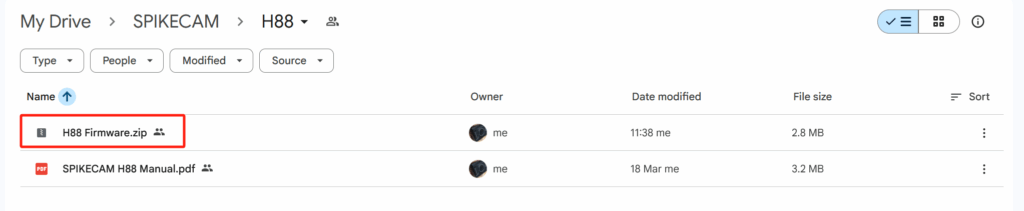
2. Connect your camera to computer. Unzip the H88 firmware.zip and Copy the `FW96675A.bin` file to the root directory of the camera.
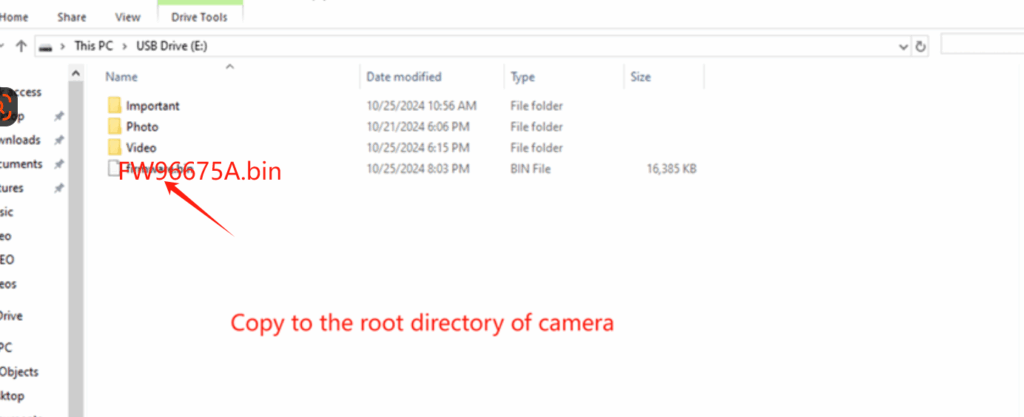
3. Disconnect the camera from the computer. Connect the camera to a power source, then press and hold the power button to turn it on. The camera will automatically start the firmware upgrade, which takes about 1-2 minutes. During the process, the LED will flash rapidly. When the upgrade is complete, the camera will automatically restart.

4. Reconnect the camera to the computer and delete the file named “FW96675A.bin.” The firmware update is now fully completed.

Leave a Comment

Your email address will not be published. Required fields are marked *

Start a conversation

Let's talk about your needs.

Product questions, OEM/ODM projects or help with your camera. Tell us what you have in mind.

[email protected]+86 13798434740

Peter Pen
Sales Manager & Co-Founder

SPIKECAM WhatsApp QR code
Chat on WhatsApp

Scan to connect with our team.

Send an inquiry

No marketing subscription. Your details will be emailed to our team to respond to your request.

SPIKECAM LIMITED

Peter Pen
Sales Manager & Co-Founder

Hong Kong Address
10/F, Corporation Park, 11 On Lai Street, Sha Tin, New Territories, Hong Kong
Shenzhen Address
6th Floor, Building B, No. 240 Hongmian 3rd Road, Longgang District, Shenzhen, Guangdong Province, China 518115
SPIKECAM WhatsApp QR code
Shopping Cart

Chat with SPIKECAM

Chat is provided by tawk.to. Connecting shares technical connection information with this service, along with any messages you send.

Send an inquiry[email protected]WhatsApp
Privacy policy